Snapchat ads in Saudi Arabia are bought at auction in Snap's Ads Manager and paid to Snap directly. Snap sets the minimum spend at $5 a day and recommends $20 to $50 a day so a campaign completes its Exploration Phase. Results depend on the campaign objective, vertical creative, and tracking through the Snap Pixel and Conversions API.
This guide is for Saudi shops and service businesses deciding whether to spend, or whom to hire. We checked Snap's advertiser pages and developer documentation on 28 October 2026; figures attributed to Snap apply as of October 2026.
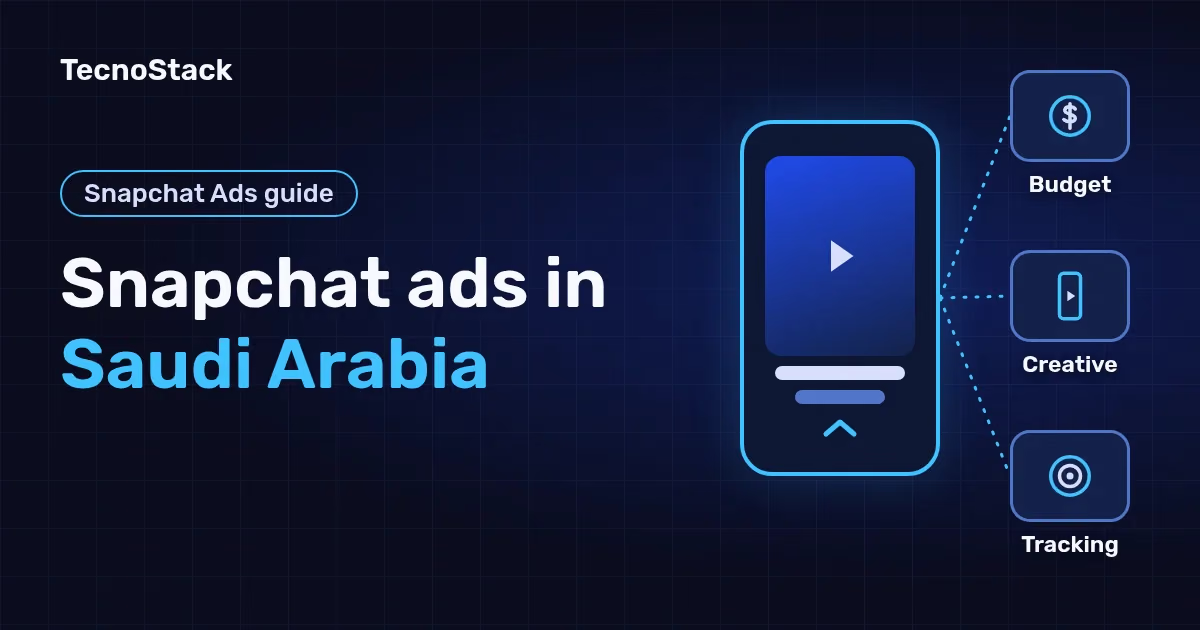
A Snapchat campaign has three layers. The campaign holds the objective, the ad set (Snap calls it an Ad Squad) holds the audience, budget, placements and bidding, and the ad holds the creative. In the auction, Snap's system picks which ad each person sees and decides what you are charged for it.
Single image or video ads appear in the Stories and Spotlight placements, according to Snap's ad formats page. A newer format, Sponsored Snaps, reaches people in the Chat tab. Every format uses a 9:16 ratio, which fills a phone screen vertically.
Snapchat suits an offer people understand visually in seconds: a product they can see, a service with a result you can film, or a seasonal promotion. If customers search for a specific service in clear words, paid search may be a better start. Our guide to choosing between paid search and Meta ads helps you pick a first test.
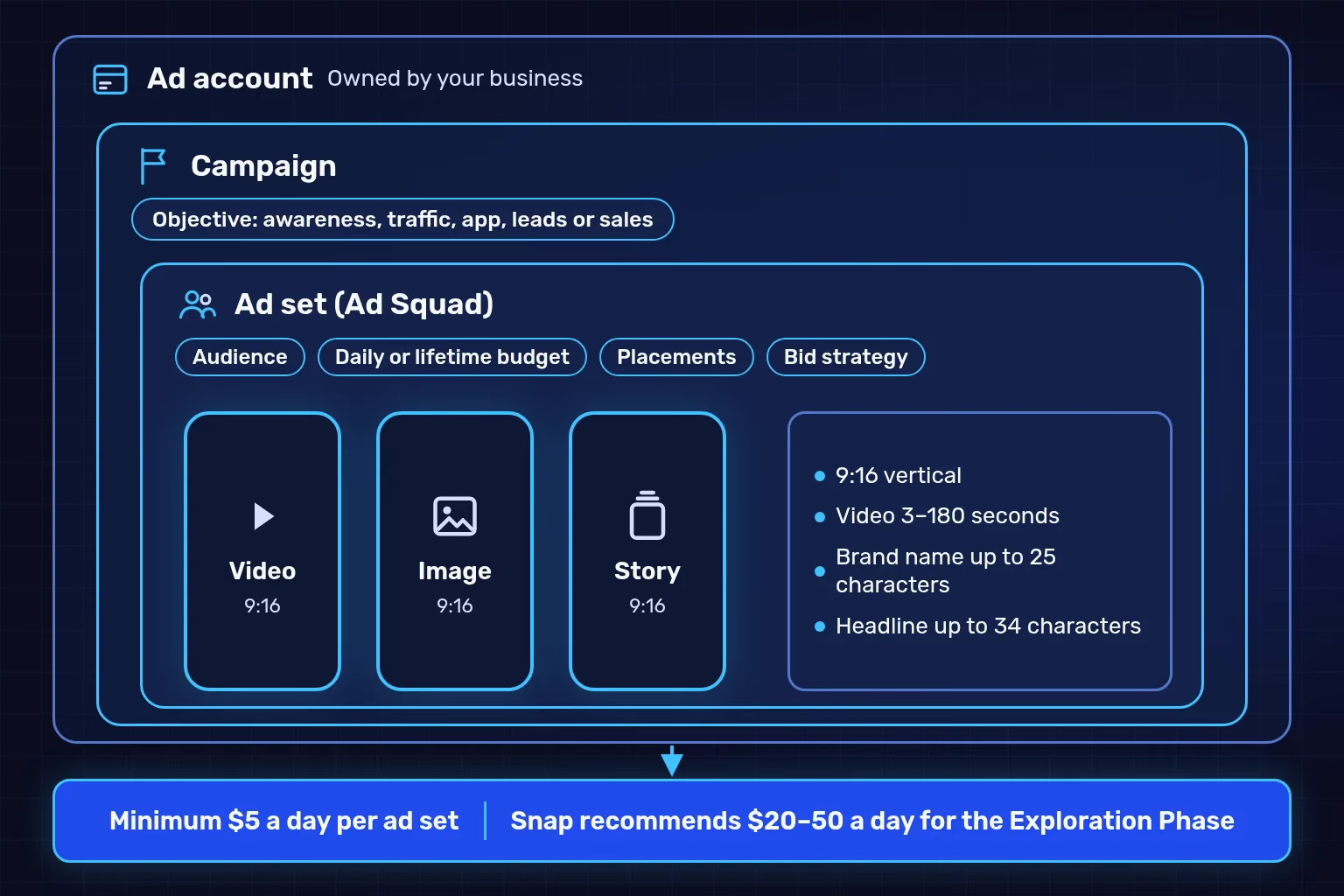
Illustrative campaign structure, as Snap's documentation describes it as of October 2026. The figures are Snap's published minimum and recommendation, not a forecast.
The cost is the budget you set, because Snap sells ads at auction and publishes no fixed price per view or click. Snap's pricing page puts the minimum spend at $5 a day and recommends at least $20 to $50 a day.
The reason for the recommendation is what Snap calls the Exploration Phase: the first period after a campaign launches, typically 4 days or more depending on its objective, when the system learns which people in your audience are most likely to respond. The Ads API documentation sets the same floor, 5 units of the account currency, on each ad set's daily budget, and you can set a lifetime budget for the whole flight instead.
An illustrative sum: a 14-day test at $20 a day is $280 of ad spend, before any management or design fees. That is arithmetic for the spend only, not a forecast of orders.
| Cost line | Paid to | What sets it |
|---|---|---|
| Ad spend | Snapchat, directly from your account | The daily or lifetime budget you set, and the auction |
| Campaign management | Whoever runs the account, or your own team | Platforms, optimisation frequency and reporting |
| Creative | Your designer or content producer | The number of images and videos, and revision rounds |
| Tracking | Your developer or app provider | Your store platform, and whether it supports Conversions API |
| Public Profile | Free | Snap says creating one is free |
We found no official Snap average cost per view or click for Saudi Arabia, and figures on other blogs disagree. Ads Manager shows reach and result estimates for your budget before launch.
Choose the objective that matches the action you are paying for, because the system looks inside your audience for the people most likely to take that specific action. Snap's campaigns documentation lists five objectives in the current creation flow:
| Objective | Suits | Prepare before launch |
|---|---|---|
| Awareness and engagement | Launching a brand or a new offer | Creative that introduces the brand from the first frame |
| Traffic | Sending people to a page or store | A fast landing page in the language of the ad |
| App promotion | App installs or re-engagement | A mobile measurement partner (MMP) connection |
| Leads | Collecting service enquiries | A short form, and someone who follows up |
| Sales | Purchases in an online store | The Snap Pixel and a purchase event with value and currency |
In the ad set you also choose a bid strategy: auto-bid, which aims for the most efficient cost per action within your budget; target cost, which tries to keep the average cost near a figure you set; or a maximum bid. Start with auto-bid until the Exploration Phase ends and you have a real number to measure against.
The audience is set in the same place: country and region, age, gender and language, device, locations within a radius of a point, and your customer lists or the site visitors the pixel has recorded.
Every Snapchat ad format is vertical at 9:16, and most accept an image or a video of 3 to 180 seconds. The table summarises what Snap publishes as of October 2026:
| Format | Suits | Published specs |
|---|---|---|
| Single image or video | New advertisers, traffic and retargeting | mp4, mov, jpg or png; video 3 to 180 seconds |
| Story Ads | Explaining a product through a series of images or videos | A series people tap through; video 3 to 180 seconds |
| Collection Ads | Stores showing several products | Products with links to buy; video 3 to 180 seconds |
| Commercials | Brand awareness | The first 6 seconds cannot be skipped; up to 180 seconds |
| Sponsored Snaps | Reaching people in the Chat tab | Up to 180 seconds; Snap recommends under 10 |
| AR Lenses and Filters | Engagement and awareness | A visible logo or brand name on Face and World Lenses |
For copy, the brand name can be up to 25 characters with spaces and the headline up to 34. The formats page lists 720×1280 and the developer documentation 1080×1920 for the main image or video, so design at 1080×1920.
What do Snap's ad policies rule out when you target Saudi Arabia?
Snap's advertising policies include rules for particular countries and categories. As of October 2026:
- Ads that promote or reference alcohol may not target Saudi Arabia.
- Ads for health products and services may only promote what the local regulator has approved in each targeted country.
- Prescription medicine advertisers need Snap's prior approval and may have to prove they are authorised to advertise the medicine. Saudi Arabia is among the countries these ads may target.
Read your category's section before designing the creative.
Design for the vertical screen from the start rather than cropping a landscape video, and put the idea and your brand name first. Check every creative before you upload it:
- 9:16 at 1080×1920, with text and logo kept away from the screen edges.
- Your brand name visible at the start of the video, not only at the end.
- A headline under 34 characters that states the benefit, not just the product name.
- Arabic copy written for the ad, not translated word for word, and one creative per language.
- The price and offer in the ad match the landing page, in riyals.
- The page people land on is in the language of the ad and loads quickly on a phone.
A better ad will not fix a page that loses visitors. Start by reviewing the landing page before spending on ads.
Install the Snap Pixel first so the system knows who visited your page, added to the cart and bought, then add Conversions API to send the same events from your server. Snap recommends that web advertisers use both together.
Installing the pixel on a Salla or Zid store
Snap's pixel page lists these routes as of October 2026:
- Zid: the Snapchat Ads app in the Zid app store installs the pixel and Conversions API together.
- Salla: the Salla Snap Pixel app installs the pixel on a Salla store.
- Shopify: the Snapchat Ads app installs the pixel in two clicks.
- Google Tag Manager: the best choice if your site already uses it.
- A custom site: the Pixel Setup Tool in Events Manager gives you code to add to the page header.
After installing, check with two Snap tools: the Snap Pixel Helper extension for Chrome, and Test Events in Events Manager. Snap's Event Quality Score shows how well your events match Snapchat accounts. If you are setting up a new store, add the pixel as part of your Salla store preparation before advertising.
Why add Conversions API, and how do you avoid counting a purchase twice?
Conversions API sends events from your server to Snap, so measurement does not rely only on the browser. To stop a purchase being counted twice when both the pixel and the server send it, the Conversions API documentation asks for:
- One event ID across both channels: the event_id in Conversions API matches the pixel's client_dedup_id, and transaction_id for purchase events.
- Order value and currency on every PURCHASE event, because both fields are required there.
- Matching data: a hashed email or phone number, or the IP address with the browser's user agent.
- The click ID: when someone taps a Snapchat ad, the ScCid parameter is added to the URL, and sending its value with the event can improve measurement, according to the Conversions API introduction.
Events older than 37 days are not eligible to be reported through Conversions API. Emails and phone numbers are personal data; check your privacy notice and consent settings before sending them.

An illustrative path for one purchase that arrives from two channels with one ID and is counted once, as Snap's documentation describes it as of October 2026.
Measure what reaches your business: confirmed orders and enquiries in your own system, not only views and taps. Judge no ad before the Exploration Phase ends.
| Metric in Snap's report | What it matches on your side | The question it answers |
|---|---|---|
| Impressions and reach | Nothing directly | Did the ad reach the intended audience? |
| Swipe-ups or taps | Snapchat sessions in GA4 with UTM tags | Do visitors arrive on the right page? |
| Add-to-cart and purchase events | Orders in your store dashboard | Are the counts close to real orders? |
| Cost per purchase | Spend divided by confirmed orders | Is there margin left after product and delivery costs? |
Snap's numbers will differ from GA4 and your store dashboard, because each system credits orders its own way over its own window. Fix one comparison method and use our guide to reconciling ad platform numbers with your order records. Before that, make sure you are checking your GA4 conversion events.
After the Exploration Phase, choose one of three: continue, change a single element (the creative, the audience or the page), or stop the campaign. Log each change and its date so you know what moved the result.
We run Snapchat ads inside our digital marketing plans: a flat monthly fee, 0% of ad spend, and you pay Snapchat directly from your own account. Every plan manages up to 4 platforms (Google, Snapchat, TikTok and Meta) with weekly optimisation.
| Plan | From (SAR/month) | Ad creatives | Tracking |
|---|---|---|---|
| Ads essentials | 2,500 | 4 ad creatives a month with Arabic and English copy, plus 2 short edits from your footage | Conversion tracking in GA4, Google Tag Manager and the platform's pixel, tested before launch |
| Ads growth | 4,500 | 8 ad creatives, plus up to 2 short edits from your footage | Tracking on each platform, with server-side events where your site or store supports them |
| Multi-platform ads | 7,500 | 16 ad creatives, plus up to 4 short edits from your footage | Server-side conversion events and retargeting audiences on every platform you run |
Every plan also includes two original 25-second 2D motion ads a month. Prices are starting points in Saudi riyals, before VAT where it applies, and your proposal confirms the final scope and price. Your ad accounts, pixels and data stay in your name, paid connectors and apps are separate, and we do not guarantee sales or ROAS. The details of each plan are on our page for managing paid Snapchat campaigns and the other platforms.
Five steps before you spend your first riyal:
- Decide the action you are paying for: a visit, an enquiry or a purchase.
- Install the Snap Pixel and check it with Test Events before launch.
- Prepare two or three vertical creatives, each with a different idea.
- Set aside a budget that covers the Exploration Phase, and do not judge the campaign before it ends.
- Match Snap's report to your store's orders, then decide: continue, change or stop.
For a second opinion before you launch, ask us to review your ad account and store tracking and we will tell you what to fix first.
We checked Snap's advertiser pages (pricing, ad formats, Snap Pixel and advertising policies) and its Ads API and Conversions API documentation on 28 October 2026; they may change. TecnoStack prices are the starting prices on our digital marketing service page on that date.