
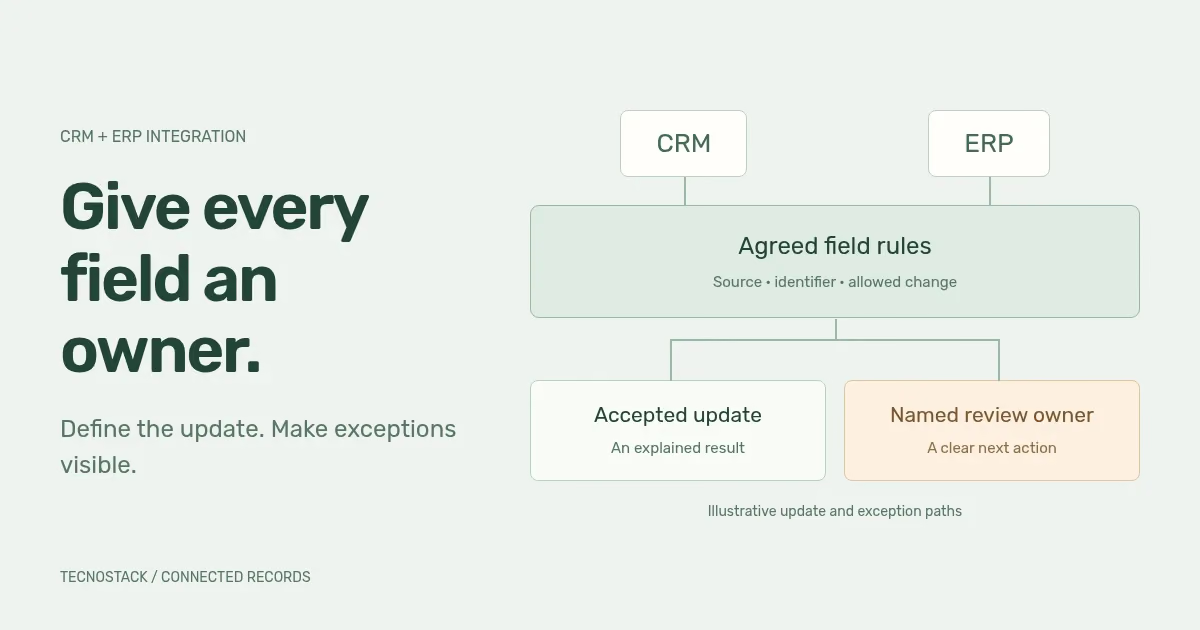
CRM and ERP integration needs an agreed owner for each shared field, stable record identifiers and a defined response when an update fails or arrives twice. Decide those rules before enabling synchronisation. A connection that can transfer a record still needs to preserve its meaning and show the team what has happened.
Begin with one business handover, such as an approved request becoming an operational order. If the underlying systems are still undecided, the CRM versus ERP guide helps define their roles. This article focuses on how already-defined roles exchange records.
Describe what starts the exchange, which record moves, which fields are included and what tells the source that the receiving system has accepted the work. Define the business state as well as the technical response. An update can reach an API without the next team being ready to act on it.
For each exchange, capture the source and destination identifiers, field meanings, allowed changes, expected delay and exception owner. Keep this record beside the actual connector configuration so the business rule can be compared with the implementation.
Microsoft's data architecture guidance recommends identifying data owners, systems and the flow between them during design. Apply that idea at the level of the records your teams actually use. Microsoft data architecture guidance
The following is a hypothetical ownership matrix for a supplier with separate sales and operations systems. It is a design exercise, not a universal rule about what CRM or ERP must own.
| Shared value | Authoritative editor in this example | Receiving use |
|---|---|---|
| Relationship contact | Sales in CRM | Operations reads the agreed contact reference |
| Approved billing entity | Finance in ERP | CRM displays the approved billing details |
| Delivery instruction after order approval | Operations in ERP | Sales reads the instruction attached to that order |
| Product reference | Catalogue owner in ERP | CRM selects from the agreed product references |
| Operational order status | Operations in ERP | Sales reads the status and when it was last updated |
| Link between the two customer IDs | Integration mapping owner | Both records can be traced without replacing their native IDs |
Do not combine different meanings just because the fields have similar names. A preferred contact name, an approved billing entity and a delivery recipient may describe different things. Give each a clear definition before deciding which value should travel.
If both systems may propose a change, describe how it is accepted. You might route the proposal to the authoritative owner rather than allowing an automatic overwrite. A “latest update wins” rule needs an explicit reason and reliable ordering information; it should not be an accidental consequence of connector defaults.
Keep the identifiers issued by both systems and a durable mapping between them. In a hypothetical record, CRM-C1042 might map to ERP-6021. A colleague changing the company's display name should not create a second customer because the integration used that name as its identity.
Agree what happens when the mapping is missing, ambiguous or points to a record that is no longer available. Put the affected item into an understandable review state until the correct action is known. Silently creating another account may make the current update succeed while leaving a reconciliation problem for the team.
Existing records need a reviewed starting point. Use the migration checklist to reconcile initial mappings and any approved merges. After that initial load, document how new records acquire a mapping and how the system distinguishes a new record from an update to an existing one.
Ask how long the receiving team can work with the previous value. That answer may differ between an order acceptance, a catalogue change and a reporting view. Document the acceptable delay and how users recognise pending or stale information.
Review the selected product editions, available APIs, event mechanisms and limits before choosing the implementation pattern. A scheduled exchange may fit one task; another may need a prompt acknowledgement or an explicit pending state. Use the mechanism the products can support and the team can operate.
When several updates describe one business change, identify whether they must be accepted together or can be completed separately. If only part succeeds, the record needs a defined state and resolution route. Do not present a partly completed handover as fully accepted.
A timeout does not prove that the destination rejected the request. It may have applied the change and lost the response. Microsoft's Retry guidance highlights this risk and advises considering whether the operation is idempotent, meaning that repeating it does not add unintended effects. Microsoft Retry pattern
Ask the implementer to show how the chosen connector identifies a repeated operation. The answer might use a supported request key, a stable source reference or another documented mechanism. Confirm its scope and retention behaviour in the actual product; do not assume a key provides a permanent, universal guarantee.
For the hypothetical customer mapping, the acceptance task could replay the same change notification and then inspect the resulting record and related actions. A successful test should establish the agreed behaviour, including whether a notification, order or other side effect is repeated. Counting the customer records alone may miss another duplicated action.
The worksheet below proposes questions for a failure review. The implementer must adapt the response to the connector and destination behaviour.
| Observed problem | What must be established | Resolution to define |
|---|---|---|
| No response after sending a request | Whether the destination applied the operation | Check by stable reference and use the agreed repeat-safe path |
| Temporary unavailability or throttling | Whether another attempt is appropriate and when | Bounded delayed retries, then a visible exception |
| Invalid field or missing related record | Which rule or dependency failed | Correct the underlying issue before replaying the affected item |
| An older change arrives after a newer one | Which version or business decision is authoritative | Apply the agreed ordering rule or send the conflict for review |
| Some related updates succeed and others fail | Which effects already exist | Preserve an explicit partial state and complete or resolve it under an approved procedure |
An exception needs a person, not only an error code. Record the affected business reference, useful diagnostic information and the next permitted action. Avoid putting unnecessary customer details into widely accessible alerts.
Coordinate manual correction with automated processing. If an operator resends an item while the queue also retries it, the same operation may race through two paths. The operating procedure should explain how to pause, inspect, resolve and resume the affected work without losing its history.
Use representative non-sensitive records in a suitable test environment. Have the receiving team review a normal update, a repeat, a delayed change and an invalid record. Include a partial outcome if the workflow can produce one. These are proposed tests, not claims that a particular product already passes them.
For each scenario, record the source ID, destination ID, change reference, expected business state, observed state and unresolved issue. Ask the operator to find the exception and explain the recovery action. The ERP implementation roadmap helps place that evidence within the wider acceptance decision.
Before handover, name who owns credentials, connector changes, monitoring and incident decisions. Agree what happens when either platform changes a field, permission or interface. A working connection at launch needs an owner after launch too.
Bring the field matrix, known connectors and example failures to the CRM and ERP integration scope review. TecnoStack reviews the existing integration coverage before proposing additional work. Published connector inclusions in store, messaging and automation plans remain as stated; any extra migration, configuration or custom development needs a clear scope.


