
A CRM migration is ready for cutover when every in-scope source record has an explained outcome, the required relationships work, and users can complete the agreed tasks. An import tool reporting success is only one part of that evidence. Start with an inventory, rehearse the move and reconcile the result before switching daily work to the new system.
This checklist is for a team moving customer records from spreadsheets or an existing CRM. It is a planning method, not a command sequence for every product. The selected platform, edition and import route determine the supported fields, limits and recovery options.
List the sources and record types before exporting files. A contact list may be only one part of the work: companies, opportunities, notes, activities, attachments and ownership assignments can have separate structures and relationships.
For each type, name the source owner, intended use in the new CRM and extraction method. Distinguish current operational records from history the team only needs to consult. If some history remains in a separate archive, define who can retrieve it and how a user reaches it from the new workflow.
Record exclusions explicitly. “Not in the new CRM” should be a reviewed scope decision, not a discovery made by a salesperson after launch. Ask the responsible business and data owners to approve what is retained, moved or excluded for your circumstances.
Save a controlled source extract with its extraction time, filters and record count. Preserve it separately from the working copy used for cleaning. Limit access to the people doing the work and use representative non-sensitive data for demonstrations where possible.
Record each transformation so another person can explain the destination value. Trimming an accidental space is different from replacing an account owner or merging two companies. Identify the rule, the affected source IDs and the person who approved a decision that changes business meaning.
Keep stable source identifiers throughout the process. Names, telephone numbers and email addresses can change or be shared. They may help a reviewer investigate a possible duplicate, but should not silently become an assumed unique identity without checking the data and business rules.
Use the worksheet below for each record type. The questions are TecnoStack's planning prompts; complete them with your actual platform documentation and process owners.
| Mapping item | What to record before the trial |
|---|---|
| Identity | Source ID, destination ID after import and the mapping between them |
| Field meaning | Source field, target field and whether their business meanings match |
| Transformation | Formatting or conversion rule, with an example input and expected output |
| Required value | What happens when a required value is missing or invalid |
| Relationship | Parent or related record, lookup rule and import dependency |
| Ownership | Destination user or team, plus the treatment of inactive source owners |
| Exceptions | Who resolves a rejected value and how the correction returns to the migration |
For Arabic and English records, test names in both languages, mixed-script addresses, international telephone numbers and the formats used for dates. Confirm that searching and displaying the imported values works for the receiving team. A readable spreadsheet is not evidence that the CRM interpreted every column correctly.
One platform example is Odoo 19. Its documentation describes a Test action before Import, and external IDs for updates and related records. It also warns that imports are permanent. These details are specific to that import workflow; check your chosen product instead of assuming an identical mechanism. Odoo 19 import and export documentation
Choose a representative trial that includes ordinary records and the cases most likely to expose a mapping problem. Include a contact linked to a company, an inactive owner, an empty required field, a suspected duplicate and a record with Arabic and English content where relevant.
Use a suitable isolated environment and confirm what the import may trigger. Automated emails, task creation and integrations need an agreed treatment during rehearsal. A migration exercise should not accidentally behave like a live campaign or send trial orders into operations.
Keep the import logs and the resulting source-to-target mapping. Then have a nominated user open records, follow their relationships and complete the agreed task. Record the actual outcome, rather than only taking a screenshot of the import completion message.
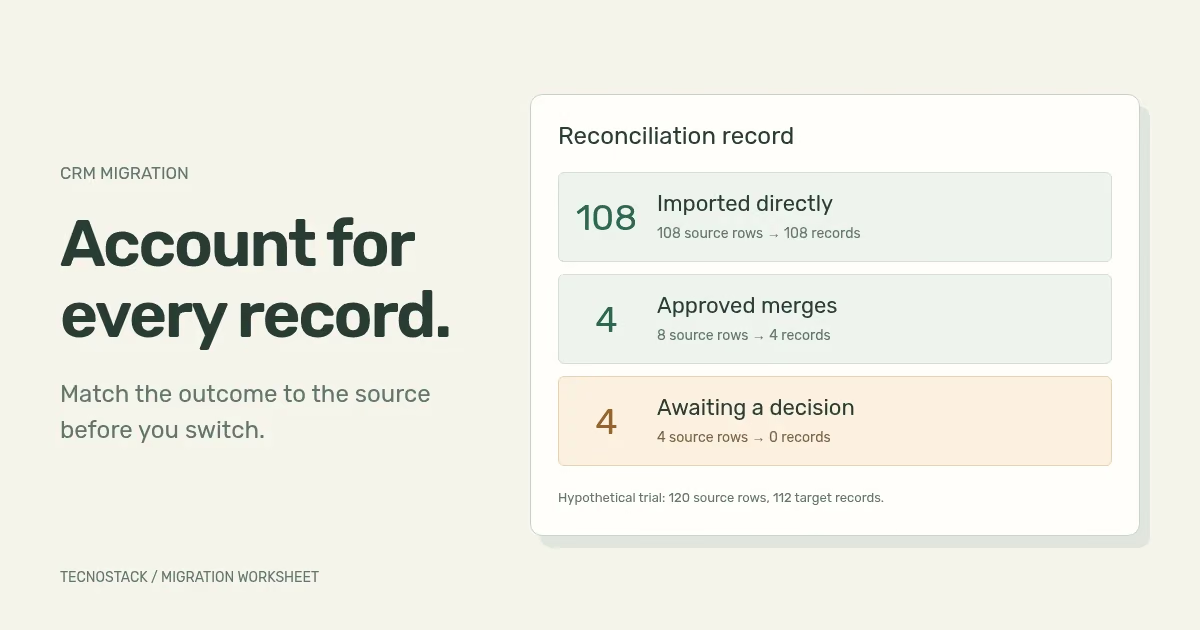
Consider this hypothetical trial containing 120 source contact rows. Reviewers approved four duplicate pairs for merging. Four other rows are rejected and remain unresolved. The figures are an arithmetic example, not a client result or a recommended tolerance.
| Source disposition | Source rows accounted for | Resulting destination records |
|---|---|---|
| Imported directly | 108 | 108 |
| Approved duplicate pairs merged | 8 | 4 |
| Rejected for review | 4 | 0 |
| Total explained in this trial | 120 | 112 |
The difference between 120 and 112 is explained, but the migration is not automatically accepted: four source rows still need a decision. The 116 source rows represented in the destination also need checks of their values and relationships. A wrong company link can survive a correct count.
Keep a row-level ledger alongside this summary. Each source ID should point to its destination ID, approved merge group or unresolved exception. If the design splits one source record into several targets, extend the ledger to represent that relationship. Do not force a one-to-one formula onto a different data model.
Review totals by record type and relevant business grouping, then inspect field and relationship checks. Agree the acceptance criteria before seeing the result. A percentage chosen afterwards to make the report look successful is not a useful release decision.
A rejection file is unfinished work. Each exception needs a reason, owner, decision and next attempt where applicable. Separate invalid values from missing relationships, unresolved duplicates and access failures so the right person can investigate.
Track corrected rows back to the original source IDs. Reimport behaviour needs to be understood before another attempt: will it update the intended record, create a new one or trigger another side effect? Test that behaviour in the chosen method rather than repeatedly uploading a file and hoping it converges.
If a record is ultimately excluded, keep the approval and the way the business will handle any work associated with it. Do not make rejected rows disappear from the reconciliation report.
After a successful rehearsal, agree how changes made since the source extract will be captured. You may need an agreed editing freeze, a final incremental extract or another product-supported method. Name the team that decides when the old system stops accepting the affected work.
Time the actual extraction, transformation, import and validation in the rehearsal. Include the people needed for decisions, not just the machine's processing time. Decide which unresolved conditions stop the cutover and who can approve proceeding.
Write down the recovery boundary. Restoring an earlier database can discard work created afterwards; switching users back can leave new records in two systems. The plan must explain how that intervening work is identified and handled. A backup file without a practised recovery process is incomplete evidence.
The receiving team needs the approved mapping, source-to-target ledger, unresolved issues and support route. Confirm who owns the final export, import logs and any controlled archive, with access and retention arrangements appropriate to the organisation.
Observe an agreed set of daily tasks after cutover and investigate discrepancies through the ledger. Keep configuration changes and new feature requests distinct from migration defects so that ownership remains clear.
If the destination itself is still undecided, begin with the CRM versus ERP decision guide. For a migration scope review, bring record types, source access details, relationships and known quality issues to the CRM and ERP service. TecnoStack scopes preparation, trial imports, reconciliation and cutover responsibilities before quoting the work.


