
Validate a dashboard by tracing its important numbers back to defined records, then checking what the reporting process changes. A tidy chart and a successful refresh are useful observations, but neither proves the total is fit for the decision. Start with the measure's definition, a fixed source snapshot and a small set of records that someone can reconcile independently.
This checklist covers data used by a business report. It is different from designing a dashboard whose subject is data-quality performance. Use the dashboard requirements brief first if the team has not agreed what a row, period, exclusion or denominator means.
Quality depends on the use. A daily outstanding-order list and a quarterly trend need different timing, detail and exception handling. Name the decision and the consequences of a missing or wrong value before setting a pass rule. There is no useful universal percentage that makes every report trustworthy.
The UK Government Data Quality Hub distinguishes six dimensions: accuracy, completeness, uniqueness, consistency, timeliness and validity. These dimensions ask different questions. A field can contain a correctly formatted date that describes the wrong event, or every required cell can be filled while the values remain incorrect.
Use those distinctions to choose checks for the fields that matter. Record the affected population and denominator whenever you publish a quality percentage. “Required delivery dates present in eligible orders” is more useful than an unexplained “data quality: 98%”. An optional comment field should not dilute a serious problem in a required order identifier.
The following original worksheet connects each check to evidence a reviewer can inspect. Apply it to the agreed reporting population, including boundary dates and known exceptions. Sample checks are useful, but state their coverage; a small clean sample does not establish that the whole dataset is clean.
| Check | Evidence to retain | A failure to investigate |
|---|---|---|
| Definition and grain | Named metric, unit, period, filters and exclusions | Orders counted in one view and shipment rows in another |
| Coverage and completeness | Expected source records and required-field counts | A branch or required date silently missing |
| Identity and uniqueness | Record keys, duplicate groups and resolution rule | Two records represent one business event |
| Types and plausibility | Accepted formats, units, ranges and source examples | A valid date refers to the wrong timezone or event |
| Joins and calculations | Counts and totals before and after each relevant step | One source amount repeats across detail rows |
| Freshness and consistency | Source cutoff, last update and cross-source checks | A new order table is combined with an older status extract |
| Filters and access | Expected results for agreed periods and user roles | A role sees an unintended subset or unrelated detail |
| Failure and ownership | Visible failure state, issue owner and recovery evidence | A failed update leaves an apparently current report |
Do not start by deleting every row that fails a rule. Preserve enough evidence to explain the issue and agree whether correction belongs in the source, a documented preparation step or the business definition. The CRM and ERP ownership guide helps assign that responsibility when several systems hold similar records.
Consider four invented orders in one creation-week cohort. All amounts are recorded in SAR, with one amount per order. The source snapshot and period are fixed. These are illustrative order amounts, not recognised accounting revenue, payment receipts or client results. We want the sum across the four orders, regardless of whether they have shipped.
The shipment source is complete for this example. Order O-4 is confirmed to have no shipments; its absence from the shipment table is not an unexplained data gap. A left join preserves that order in one row with no matching shipment. Orders with several shipments appear in several joined rows.
| Order | Recorded amount, SAR | Shipment rows | Amount summed after a left join, SAR |
|---|---|---|---|
| O-1 | 100 | 2 | 200 |
| O-2 | 100 | 1 | 100 |
| O-3 | 250 | 3 | 750 |
| O-4 | 500 | 0 | 500 |
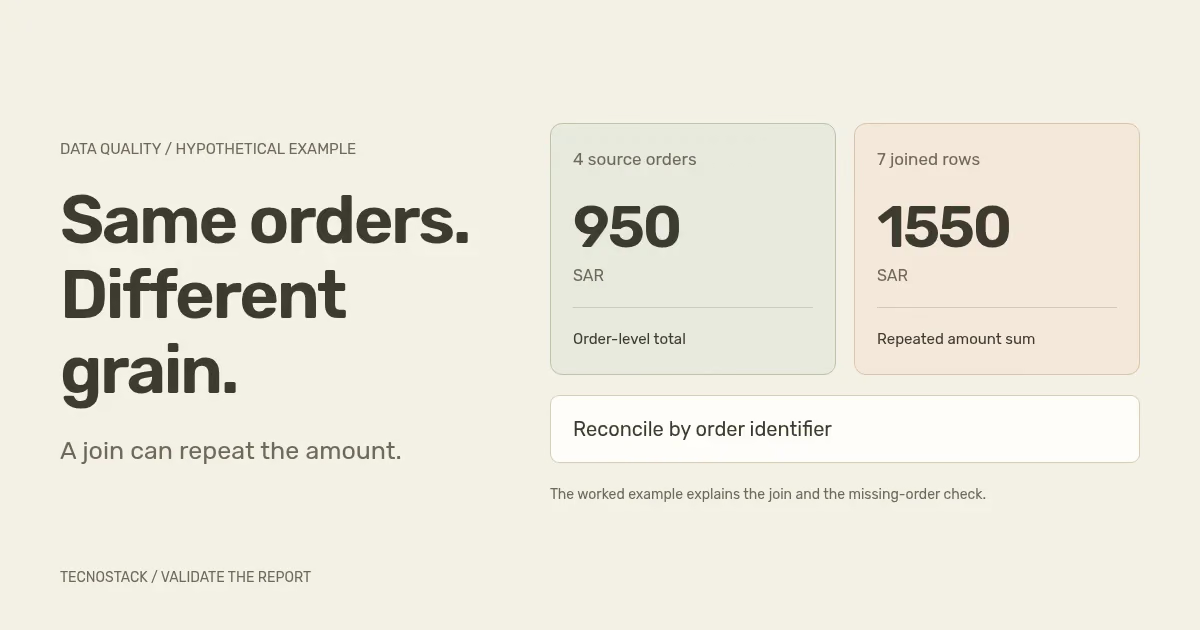
The source has four orders totalling 100 + 100 + 250 + 500 = 950 SAR. The left join produces seven rows and a naive sum of 200 + 100 + 750 + 500 = 1550 SAR. No source amount changed. The report repeated order-level amounts at shipment-level detail.
An inner join would lose O-4 and produce six rows totalling 1050 SAR. That result is closer to 950, but it still contains two errors: repeated amounts and a missing eligible order. A plausible total can hide errors that partly offset each other.
Summing distinct amount values is also wrong here: 100 + 250 + 500 = 850 SAR. O-1 and O-2 are different legitimate orders that happen to have equal amounts. Their shared value is not a duplicate-record key.
Keep the order measure at its defined grain. Depending on the model, that may involve a separate order-level measure, an explicit grouping by order identifier or preparing shipment summaries before joining. Choose and test the implementation against the required filters. Microsoft's relationship guidance notes that model relationships do not enforce data integrity; drawing a relationship is not a substitute for this reconciliation.
Profiling helps expose empty fields, errors and suspicious distributions. Microsoft's Power Query profiling documentation says the default profile covers the first 1,000 rows; the editor can switch to the entire dataset. Record which scope you inspected, especially when later rows come from different branches, periods or imports.
The same documentation distinguishes distinct values from values appearing only once. In our amount column there are three distinct values, but only two values occur once. Neither count tells you the number of legitimate orders. Interpret the tool's label in the context of the field rather than treating any uniqueness percentage as a universal quality score.
Check transformation rules as well as profile bars. Microsoft's common authoring issues explain that sorting is not guaranteed to survive operations such as merges, grouping or duplicate removal. Do not assume sorting by a date and removing duplicates necessarily keeps the intended record. Specify a deterministic selection rule, including ties, and retain the excluded-record evidence.
Distinguish zero, unknown, not applicable and unavailable. In the worked example, zero shipments is supported by a complete source. In a real report, a failed shipment import would be a different state. Displaying zero after that failure could send the team towards the wrong operational action.
Record source update time, report retrieval time and the business cutoff where they differ. Google documents Data Studio freshness as connector-dependent behaviour involving stored query results. Refreshing a visual does not make delayed upstream events available. Define the expected delay and the person who acts when it is exceeded.
Agree what happens when an important check fails: withhold the affected measure, show a clear qualification or retain a labelled previous successful result where appropriate. Test that behaviour with the intended reader. A hidden error log is insufficient if the visible dashboard still invites an unsupported decision.
Keep an issue record containing the affected measure, record examples, period, expected and observed result, owner and resolution. After a correction, rerun the relevant checks and verify that another period or role still behaves as intended. Preserve the definition version alongside the evidence so later reviewers can reproduce the result.
The business owner approves the meaning; the implementation owner demonstrates the calculation and access behaviour. If the report will include generated commentary, the reporting automation and AI guide adds a separate claim-review and acceptance worksheet. Bring the current report, source inventory and unresolved examples to our business dashboards and reporting service when the team needs a scoped validation or implementation plan. Existing dashboard inclusions are reviewed before additional work is proposed.


