Website maintenance cost in Saudi Arabia starts from SAR 149 a month with TecnoStack, excluding VAT where it applies. That buys managed hosting with daily backups, availability checks every 5 minutes, SSL renewal and up to 30 minutes of maintenance a month. The price rises with the number of sites, maintenance time, backup retention and how often restores are tested.
This guide is for owners of a live or nearly finished website who want to know what they pay for each month: the tasks, our plan prices and limits, what raises the cost, the deadlines for 2026 and 2027, and what to get in writing. If you are still budgeting the build, read what the website itself costs to build. Apps are a different job with different line items, covered in our guide to mobile app upkeep costs.
Launch support fixes defects in what the developer delivered, for a fixed period. Maintenance is the ongoing work that keeps a site updated, protected and recoverable after that.
On our website plans, launch support covers defects in the delivered scope for 180 days, or 270 days on Connected website. Our website, WordPress and WooCommerce plans also include the first 3 months of our managed hosting. After those 3 months you keep the hosting at its monthly price, or move the site and hand its upkeep to your team or another provider. Avoid a site that nobody is responsible for updating.
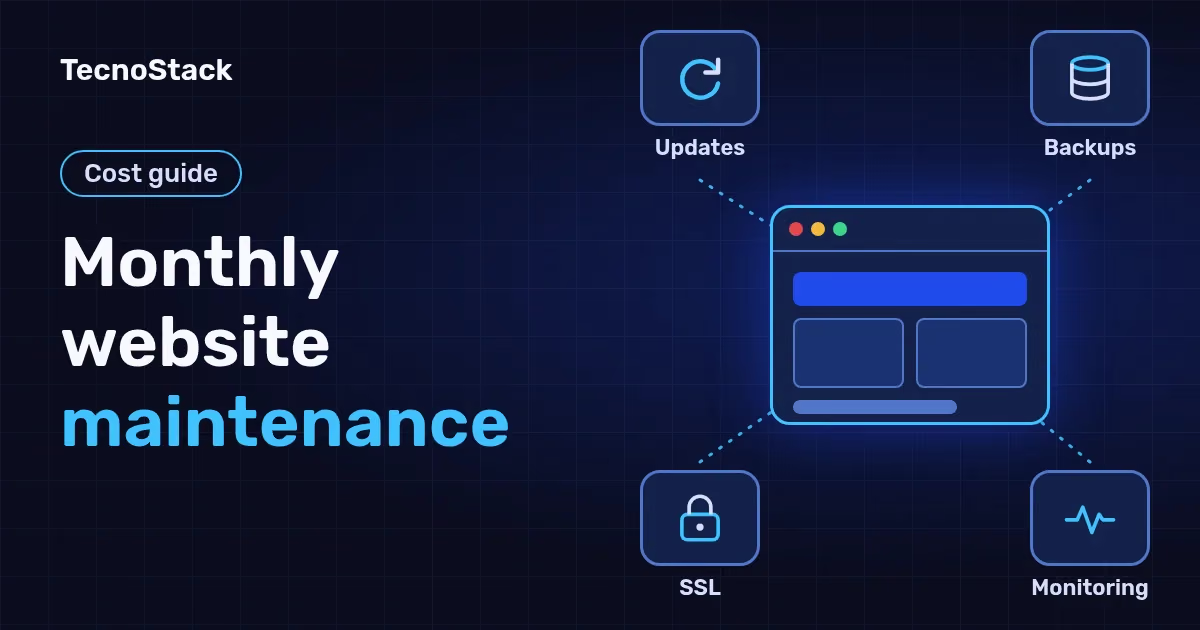
Monthly maintenance covers software updates, backups with restore tests, availability monitoring, certificate renewal, malware scanning, small fixes and a report. Here is what to ask any provider about each task:
| Task | What it means in practice | What to ask the provider |
|---|---|---|
| Core, plugin and theme updates | Installing updates once they are checked for compatibility | How often do you check for updates? Are they tested before the live site? |
| Backups | A daily copy of the files and the database | How many days are backups kept, and where? |
| Restore tests | Actually restoring a backup to prove it works | When was the last restore tested? |
| Availability monitoring | An automatic check that spots downtime | How often does it run, and who receives the alert? |
| SSL certificate | Issuing the certificate and renewing it before it expires | Is renewal automatic, and who follows up if it fails? |
| Malware scanning | Finding suspicious files or code | Is cleanup included or priced separately? |
| PHP and database versions | Moving to a supported version before support ends | Which version is the site on, and when does its support end? |
| Small fixes and edits | Correcting a minor fault or changing text or an image | How many minutes a month, and does unused time roll over? |
| Monthly report | A record of updates, backups, uptime and time used | What does the report include? |
Automatic updates alone are not enough. WordPress's own documentation says minor core releases, its maintenance and security updates, install automatically by default, and new installations since version 5.6 also take major core releases. Plugins and themes only update automatically in special cases, according to the WordPress upgrade documentation as of October 2026. The same page recommends backing up before an upgrade and checking that the backup is there and usable.
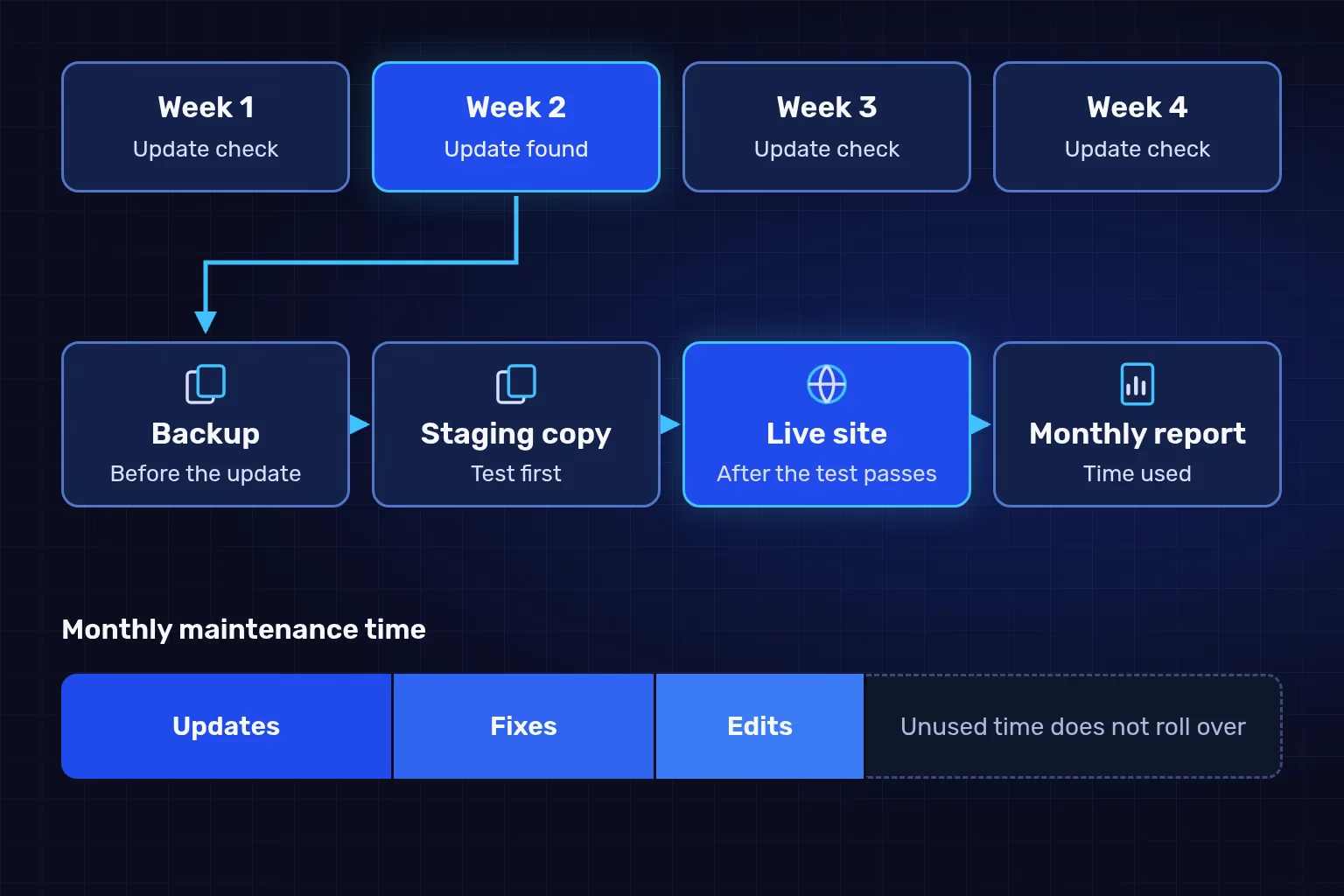
An illustrative monthly maintenance cycle: the backup comes before the update, the staging test comes before the live site, and the report shows how much maintenance time was used.
Our website maintenance is part of managed hosting, with starting prices of SAR 149, 299 and 599 a month, excluding VAT where it applies. The plans differ in maintenance time, number of sites and how deeply changes are tested:
| Plan | From (SAR/month) | Monthly maintenance time | Backups and restore tests | Update testing and security checks |
|---|---|---|---|---|
| Managed starter (1 site) | 149 | Up to 30 minutes for updates and small fixes | Daily, kept 7 days; test restore every 6 months | One pre-update staging check a month where the hosting supports it; monthly malware scan |
| Managed business (up to 3 sites) | 299 | Up to 1 hour, including small content edits | Daily, kept 14 days; test restore of one site every 3 months | Updates tested first on a staging copy of one site you choose, a backup before every update; weekly malware scan |
| Managed growth (up to 5 sites) | 599 | Up to 2 hours, including small content edits | Daily, kept 30 days; test restore of one site every month | A staging copy of each site; weekly malware scan; speed and security review with recommendations every 3 months |
Every plan also includes SSL setup and renewal, availability checks every 5 minutes, a monthly report on uptime, backups, updates, renewal dates and maintenance time used, and support in Arabic and English during business hours. We check for WordPress core, plugin and theme updates once a week, record the priorities, and install them within your maintenance time.
Anything outside the plan is billed separately, so know it before you subscribe:
- Domains, email and licences. Domain renewals, mailboxes, paid plugin and theme licences, and overages.
- Application development and new features. Maintenance keeps what exists working; it does not build new pages or functions.
- Hack cleanup. The scan flags problems; if cleanup needs more than your maintenance time, we quote it before starting.
- Unused time. It does not roll over to the next month.
The full inclusions, including storage and transfer limits and the number of site migrations, are on our managed hosting page, which puts your website maintenance cost and hosting in one monthly bill. You can also compare hosting and care prices next to our other services. Your proposal confirms the final scope and price.
Maintenance costs more as more things can break and as breakages cost more. We review these factors before suggesting a plan:
- Number of sites. Each site has its own updates, backups and certificate, which is why the plans run from one site to five.
- Number and type of plugins. Every plugin adds an update to track and a possible conflict to test, and paid plugins only receive updates while their licence is current.
- Payments and orders. A WooCommerce store needs a test order and a checkout check after updates, which takes extra time.
- Custom code. Code written only for your site is updated by nobody else, and a platform update may require changes to it.
- Backup retention and test frequency. Thirty days of backups and a monthly test protect you more than seven days and a test every six months, and cost more.
- Staging copies. Testing an update before publishing it uses time and storage, but it surfaces conflicts before customers see them. We explain why updates go to a staging copy first in a separate guide.
- Bilingual content edits. Changing text in Arabic and English takes longer than changing it in one language.
How do you estimate the maintenance time your site needs?
Estimate from your site's history. Look back over three months: how many core, plugin and theme updates appeared, how many text or image changes your team requested, and how often the site failed. With no history, start with the plan closest to your site's size and watch the time used in the monthly report.
An illustrative example: a company runs an Arabic and English brochure site on WordPress and asks for two or three text changes a month. Content edits are not part of Managed starter, so Managed business, with an hour a month, is the closer fit. If the report keeps showing that an hour is not enough, that points to a larger plan or separately agreed work.
Two deadlines recur on every site: the end of support for its PHP version, and the shrinking lifetime of SSL certificates. Bodies outside your hosting set these dates, so no provider can postpone them:
| Date | What changes | What to do |
|---|---|---|
| 31 Dec 2025 | PHP 8.1 reached end of life | A site still on it gets no security fixes; upgrade after a staging test |
| 15 Mar 2026 | New SSL certificates are capped at 200 days | Confirm renewal is automatic and that failure alerts reach a named person |
| 31 Dec 2026 | Security support for PHP 8.2 ends | Plan the upgrade before this date, then test forms and checkout |
| 15 Mar 2027 | The cap drops to 100 days | Manual renewal becomes a task every few months |
| 31 Dec 2027 | Security support for PHP 8.3 ends | Put the next upgrade in your 2027 plan |
| 15 Mar 2029 | The cap drops to 47 days | Manual renewal is no longer realistic |
PHP dates come from the supported versions table and the end-of-life list on php.net. Certificate lifetimes come from the CA/Browser Forum Baseline Requirements (section 6.3.2). All are as of October 2026.
WordPress recommends PHP 8.3 or greater, and says the older versions it still runs on have reached their official end of life and may expose a site to security vulnerabilities, according to the WordPress requirements page as of October 2026. An upgrade takes three steps: test it on a copy, check forms, checkout and logins, then move it to the live site. We set out how to test a PHP update on a WordPress site in a separate article.
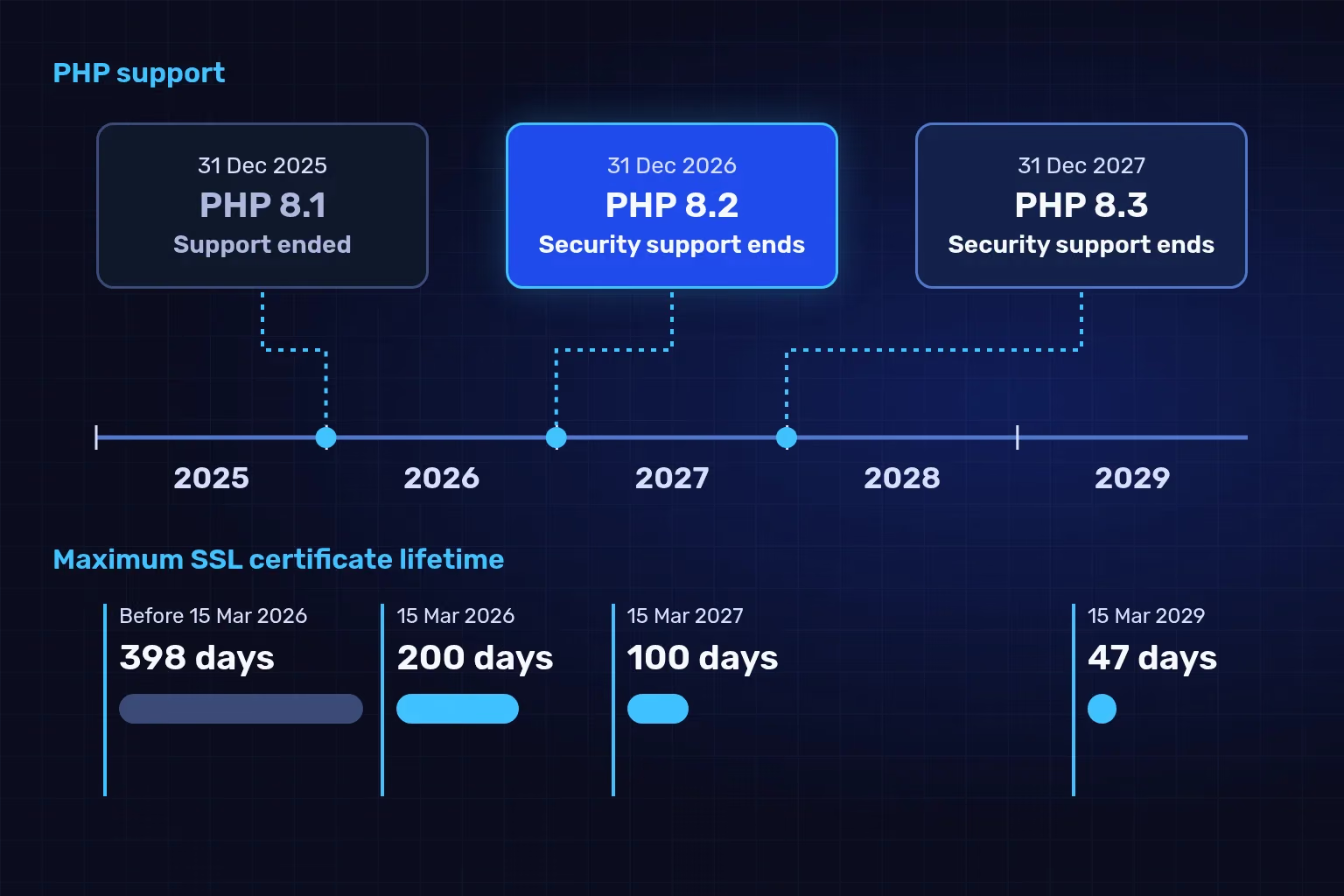
Dates from the PHP release tables and the CA/Browser Forum Baseline Requirements as of October 2026. The figure orders the deadlines; it does not tell you your site's version, which your hosting panel shows.
Choose a monthly plan if the site brings in orders or leads, pay per fix if it is static and someone watches it, and an in-house admin if you run enough sites and systems to fill their time:
| Criterion | Monthly maintenance plan | Pay per fix | In-house technical staff |
|---|---|---|---|
| Cost visibility | A fixed monthly amount with written inclusions | Unpredictable; appears when something breaks | A fixed salary plus hiring costs |
| Who tracks updates and deadlines | The provider, within agreed time | Nobody, until something fails | The employee, if they have time |
| Backups and restore tests | On a schedule written into the contract | Often untested | Depends on the team's discipline |
| Best for | Sites that take orders or enquiries | Static brochure sites | Organisations with many sites and systems |
Whichever you choose, write down who owns each account: the domain registrar, the hosting, the site's admin panel and any Cloudflare account. If you have not settled the hosting type yet, start with a comparison of hosting types for company websites, then choose the maintenance.
A quote should name the tasks and their time, the backups and how restores are tested, the support and its limits, and who owns the accounts. Check these points before you sign:
- The monthly task list, maintenance time in minutes or hours, and whether unused time rolls over.
- How long backups are kept and where, how often restores are tested and who runs them.
- Whether updates are tested on a staging copy before the live site, and whether there are documented steps to roll back.
- Support hours and language, what counts as urgent and how you get in touch.
- Pricing for work outside the plan: hack cleanup, new features and overages.
- A list of accounts and access, who owns each one, and how they are handed over if the contract ends.
- The hosting provider and the region where data is stored, in writing before you buy.
- What the monthly report includes.
What happens to the site during a maintenance window?
Most maintenance needs no downtime. If a major upgrade needs a pause, Google recommends keeping the site online with limited functionality where possible. For a short closure, visitors should see an informational page served with a 503 status for a few days at most, with a Retry-After header, and robots.txt must not return 503 because that blocks all crawling, according to Google's guidance on pausing a site as of October 2026. Ask your maintenance provider how they handle this during an upgrade window.
Four free steps come first:
- List the accounts: domain registrar, hosting, admin panel, and who owns each one.
- Find out which PHP version your site runs and when its support ends.
- Ask for a backup to be restored to a staging copy, and check that it works.
- Count your plugins and themes, and remove the ones you do not use.
If these steps show that nobody is looking after your site, ask us to review your maintenance needs and we will suggest a plan once we have seen it.
We checked the PHP dates, WordPress requirements, SSL certificate lifetimes and Google's guidance in this article against their official sources on 27 October 2026, and they may change after that. TecnoStack prices are the starting prices published on our managed hosting service page on the same date, in Saudi riyals excluding VAT where it applies; your proposal confirms the final scope and price.