
Set up SPF, DKIM and DMARC around every system authorised to send for your domain. Staff mail is only one path: a website, CRM, help desk and campaign platform may send independently. Check their actual messages, authenticated domains and alignment before changing the domain's policy.
A useful review produces a sender inventory, message evidence and a named owner for each correction. A green DNS dashboard is insufficient if a website still sends under an unrelated identity. Equally, a DMARC pass does not promise that a recipient will place the message in the inbox.
Start with the people who operate each system. Ask which visible From address it uses, which provider sends the message, and who can change that configuration. Include occasional senders such as invoicing tools; a quiet week of reports may not reveal a system that sends monthly.
Use this original worksheet before requesting DNS changes. Record the envelope domain and DKIM signing domain from representative received messages and the provider's configuration, rather than assuming they match the address shown to the recipient. Keep message details in an appropriately restricted project record.
| Sending path | Business owner | Identity and evidence to record |
|---|---|---|
| Staff mail | Mail administrator | Visible From, envelope domain, DKIM signature and receiving results |
| Website messages | Website maintainer | Form/transactional provider, configured sender and an actual received example |
| CRM or help desk | System owner | Shared-address behaviour, sending integration and signature identity |
| Marketing campaigns | Campaign operator | Sending domain, provider authentication and representative campaign evidence |
| Finance or other tools | Responsible operations team | Infrequent senders, provider documentation and a scheduled verification task |
| Retiring source platform | Migration owner | Remaining authorised traffic and the evidence needed before removing its authorisation |
An unknown sending source is an investigation item. It may be an overlooked legitimate integration or unauthorised use. Do not authorise every source merely because it appears in a report. Establish the system and its owner first, then decide whether to configure or remove the path.
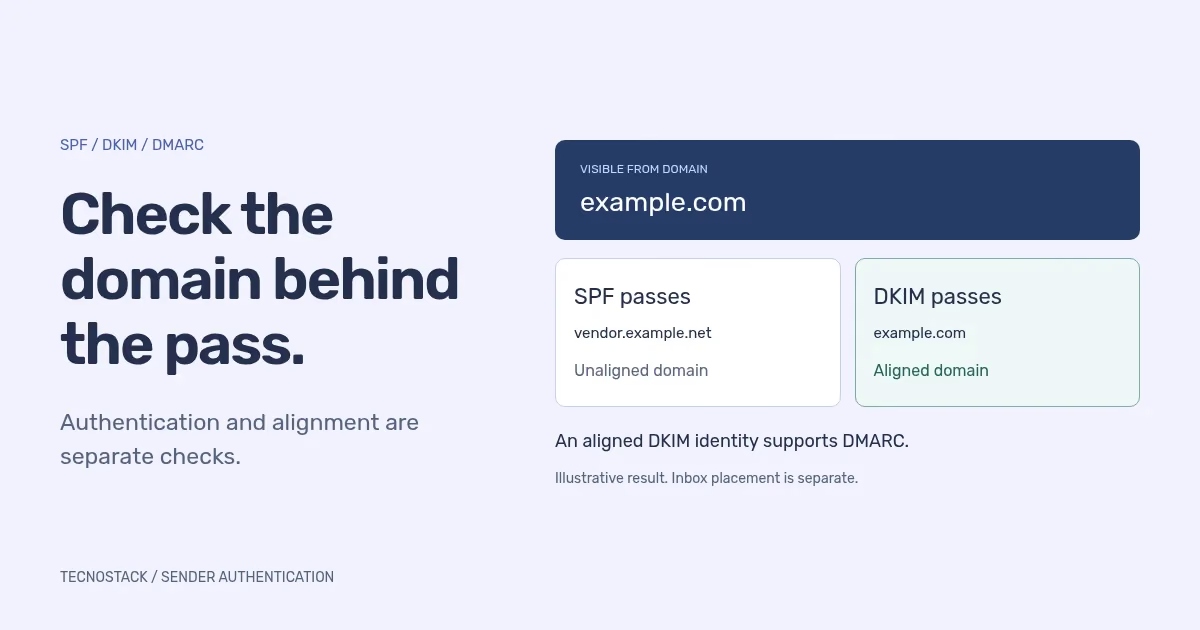
SPF checks whether a sending host is authorised for the domain being evaluated, normally the envelope sender domain. That can differ from the visible From address. DKIM verifies a signature covering selected message content using a key associated with the signing domain. DMARC checks whether a successful authenticated identity aligns with the visible From domain.
Microsoft's DMARC configuration guide distinguishes the envelope sender, visible From and DKIM signing domain. A message can pass DMARC through aligned SPF or aligned DKIM. Review both mechanisms in the sending configuration rather than treating one passing message as evidence that every path is correctly configured.
The difference is easiest to see in examples. The following original cases use reserved example domains and assumed test results. They are not captured headers or evidence from a live company. Exact matching domains are used so the examples do not depend on a disputed organisational-domain boundary.
| Illustrative case | Visible From domain | Authenticated result | DMARC interpretation |
|---|---|---|---|
| Staff message | example.com | SPF passes for example.com; DKIM passes for example.com | An aligned authenticated identity exists |
| CRM using provider identities | example.com | SPF and DKIM pass only for vendor.example.net | Those successful checks are unaligned; they do not produce a DMARC pass |
| Campaign with a domain signature | example.com | SPF passes for vendor.example.net; DKIM passes for example.com | The aligned DKIM result can produce a pass |
| Forwarded message with intact signing | example.com | SPF fails; DKIM still passes for example.com | The aligned DKIM result can produce a pass |
The forwarding case assumes the signature remains valid. An intermediary can change content or handle the message differently, so test relevant forwarding and mailing-list paths instead of assuming the example describes every route. A receiver's other authentication or filtering verdicts are also distinct from the DMARC result.
RFC 9989, published in May 2026, replaces RFCs 7489 and 9091. It removes the older pct tag and updates organisational-domain discovery. Do not reuse an old percentage-based rollout recipe as current protocol guidance. Check what the actual providers support before applying configuration examples.
The standard also says senders using p=reject must not rely solely on SPF and must apply valid DKIM signatures. That sender requirement is separate from the per-message pass rule above. Keep the current standard, the provider's documented implementation and observed message results together in the review.
For practical alignment work, distinguish relaxed matching of organisational domains from strict exact-domain matching. A shared-looking suffix is not enough to establish the organisational boundary. If a configuration relies on subdomains, verify the relevant discovery and alignment behaviour rather than reducing the rule to the last two labels of a domain.
Review the existing record before adding anything. Google's SPF troubleshooting guidance identifies multiple SPF records, missing third-party senders and excessive DNS lookups as common problems. Maintain one SPF policy for each evaluated domain, and verify its syntax and lookup behaviour with the authorised providers included.
That does not mean a domain can have only one TXT record of any kind. Verification records and other services can also use TXT. Identify the specific SPF policy, avoid deleting unrelated records and retain the previous configuration in the change record. A copied provider example may omit another service your organisation legitimately uses.
For DKIM, verify both published key information and the sending service's signing configuration. Inspect a received message to confirm which domain signed it and whether verification passed. Publishing a DNS entry alone does not prove that the provider is signing messages with that identity. Coordinate key changes with the provider's documented process.
For DMARC, record the domain, current policy, reporting destination and alignment configuration. Confirm the organisation controls the relevant DNS and that reports can be received and reviewed. Access to a registrar account is not necessarily access to the authoritative DNS host.
For a new rollout, begin with a plan to identify legitimate traffic and review authentication before tightening handling. Google's DMARC setup guidance recommends inventorying third-party senders and observing reports. Its provider examples should be assessed alongside the current standard; do not copy an older enforcement-percentage recipe unchanged.
If a policy is already enforced, preserve the current state while investigating unless the responsible owner agrees a specific change. A blanket move to observation mode can weaken existing protection without addressing the underlying configuration. Define the problem and desired result first.
A useful change record has four parts:
- Evidence: the sending path, timestamp, relevant authentication results and observed failure.
- Proposed correction: the provider or DNS setting involved, with its owner and expected effect.
- Verification: representative messages, reports and receiving responses to check after the change.
- Follow-up: unresolved senders, the next review and the conditions for retaining or reversing the change.
DMARC reports help expose domain use, but they are not a complete inventory of every message or recipient decision. Review the reporting period, available coverage and actual sending schedule. Give unresolved legitimate senders a named action rather than treating an empty report as proof that the configuration is complete.
Keep the sender inventory current when adding a website integration, changing a CRM, starting a campaign service or migrating employee mail. Retire an old source's authorisation when the owner has verified that its legitimate work has ended, following the agreed transition plan.
Use the business email migration checklist to connect authentication review with mailbox and shared-access acceptance. For campaign audience rules, recipient responses and inbox-placement investigation, continue with the email deliverability checklist.
TecnoStack's business email service can scope the cross-system review and operating handover. Existing managed-hosting plans already include their stated SPF, DKIM and DMARC checks using the mail provider's settings. Review that existing inclusion first, then agree any additional sender configuration or migration work.


