
A business email migration checklist should name what must move, how each item will move, and who will confirm it works. Inventory mailboxes, calendars, contacts, shared access and connected senders separately. Then run a representative pilot, resolve exceptions and agree the mail-flow change before closing the old environment.
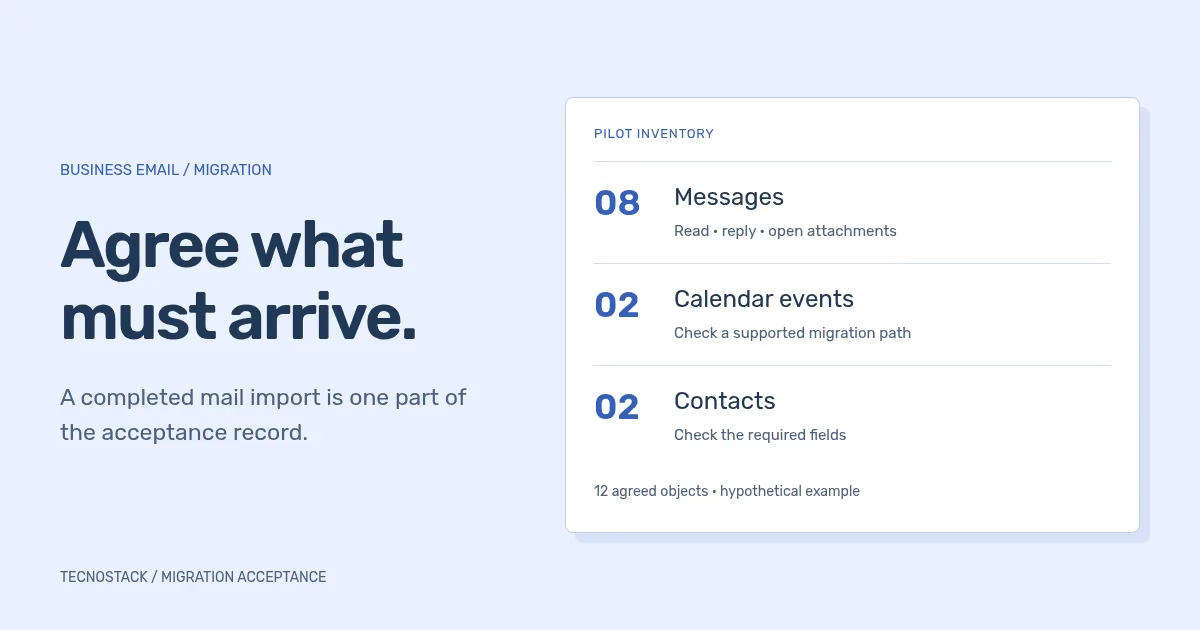
Consider an illustrative pilot with eight messages, two calendar events and two contacts. Copying all eight messages does not complete the twelve agreed objects. If the selected method handles only mail, the four other objects still need a supported route and acceptance check. This is a planning example, not a provider report or client result.
Start with people and the work they perform. A sales address might be an alias, a group, a delegated account or a shared inbox. Those arrangements have different access and sending behaviour. Record the current arrangement and intended destination instead of assuming every visible address is a separately licensed mailbox.
Use the original worksheet below with the person who owns each business task. Record unknowns as open decisions. An unresolved archive requirement should remain visible rather than disappear into a general promise to migrate “all email”. Keep the inventory in an access-controlled project location.
| Inventory item | Record before choosing a method | Owner or evidence |
|---|---|---|
| Domains and administration | Source, destination, tenant administrators and authoritative DNS host | Verified account owner and authorised access path |
| People and mailboxes | Source-to-target mapping, account status and required licences | Responsible manager and administrator |
| Mail history | Date range, folders or labels, attachments and known size limits | Agreed sample and method documentation |
| Calendars and contacts | Personal/shared objects, recurring events and required contact fields | User who relies on those objects |
| Shared addresses | Alias, group, delegation or shared inbox; who reads and sends | Current permissions and intended workflow |
| Rules and clients | Filters, signatures, mobile/desktop clients and local-only data | User task list and configuration record |
| Other senders | Website, CRM, help desk and campaign platform | System owner and sender configuration |
| Retention and closure | Archive, hold or retention requirements; source access and exit conditions | Responsible policy owner and closure decision |
A mailbox total alone is not a sufficient scope. Two people may have the same amount of mail but very different calendar, delegation and client requirements. Identify these differences before estimating effort or scheduling the move.
Read the documentation for the actual source-to-target path. Microsoft's IMAP migration guidance states that the method migrates mail in folders, not contacts, calendar items or tasks. Destination accounts and appropriate licences must be prepared; the migration process is not a substitute for provisioning users.
Microsoft's Google Workspace migration covers additional types but has explicit exceptions, including shared calendars and room bookings. Some contact details are excluded, and migrated rules arrive disabled. A source platform's name therefore does not prove that every feature or permission will survive the move.
Google's data import overview describes supported mail sources, prerequisites and limits. Its destination users must already exist. Choose an appropriate separate method for required non-mail data rather than inferring coverage from an email import label. Confirm the authorised administrator workflow and any restrictions applying to the implementation arrangement.
For each exclusion, agree one of three outcomes: a supported alternative route, an explicit decision to recreate the configuration, or a documented exclusion accepted by the responsible owner. Do not silently narrow the business requirement because a convenient tool cannot fulfil it.
Choose users who represent distinct workflows. Include a person who uses calendar invitations, someone who sends from a shared address, and a person whose mail includes attachments or unusual folder organisation where those cases exist. A small pilot is useful because of its coverage, not because it happens to finish quickly.
Record the agreed sample before copying it. In the twelve-object example, identify eight particular messages, two events and two contacts without exposing their contents in public project tickets. Check the messages, then verify the four other objects through the separately supported method. Do not turn twelve objects into a claim about the completeness of an entire mailbox.
Include observable tasks: find an older conversation, open its attachment, reply using the correct address, inspect a calendar invitation and find the required contact details. Check the actual clients people will use. Document changes they need to make, such as recreating a signature or connecting a mobile account.
Compare method reports with the agreed data and user tasks. Google's import-report documentation explicitly allows a completed user import to contain messages or labels that did not import. It distinguishes errors, warnings and skipped items. A skipped item can be an unchanged message already imported, but other cases require investigation.
Keep an exception record with the affected object, report reason, intended outcome, corrective action and reviewer. An empty error list does not prove that an unsupported calendar moved. Likewise, different folder or label counts do not establish data loss without examining the method's mapping and the underlying messages.
Google's monitoring guidance identifies behaviour that affects reconciliation: settings and signatures are not imported for Google-source imports, and delta imports can leave previous draft versions behind. Review source-specific behaviour before deleting apparent duplicates or declaring a difference harmless.
Retention or archive activity can also change where items appear. Ask the responsible administrator and policy owner how to account for it during verification. Do not suspend required retention or holds simply to make two totals match.
Use a separate acceptance record for copied data, access, routing and operating responsibility. The worksheet below is a starting point; replace generic checks with the agreed business tasks and record the result and reviewer for each.
| Acceptance area | Practical check | Closure evidence |
|---|---|---|
| Historical mail | Find agreed old messages and open supported attachments | Sample results and resolved exceptions |
| Calendars and contacts | Verify required objects and fields through the chosen path | Coverage, exclusions and user confirmation |
| Shared work | Read, reply and send as the intended shared address | Correct permissions and visible sender |
| User access | Sign in and perform tasks in agreed clients | Access results and configuration instructions |
| New mail flow | Receive and reply through agreed external and internal routes | Timestamped results from the destination |
| Connected senders | Check website, CRM and campaign sending paths | Sender ownership and authentication evidence |
| Late source mail | Inspect and reconcile items arriving during transition | Method-specific final reconciliation record |
| Operating handover | Confirm administrators, recovery contacts and support scope | Named owner and source-closure decision |
Changing MX records affects the destination for new incoming mail. It does not copy historical data. Microsoft's domain-record guidance makes that distinction and requires destination readiness before routing changes. DNS host and domain registrar may be different organisations; confirm who can actually make the change.
Set the source-retention period and final reconciliation around the selected method and business requirements. Preserve access until the agreed closure criteria are met. A generic waiting period or a successful test message cannot replace the decision record.
Ask for a scope listing providers, domains, account mappings, required data, exclusions, pilot tasks, routing responsibilities and acceptance owners. Include provider licences and any migration tools as explicit commercial items. Separate a mailbox move from wider file, chat or device-management work.
TecnoStack's business email setup and migration service starts with that bounded review. Existing managed-hosting inclusions remain authoritative for the work already covered by your plan. For campaign-specific sender and audience issues, use the separate email deliverability checklist.
If the destination is still undecided, use the Google Workspace and Microsoft 365 comparison to test the required tasks before selecting the migration path.
For the sender inventory, use the SPF, DKIM and DMARC guide to check identities and alignment across staff mail and connected systems.
Use the DNS cutover worksheet to turn those acceptance decisions into mail-flow checks and a documented source-closure decision.


