
An email deliverability review should connect the sending system, audience permission, authentication results and recipient-provider responses. Start with that evidence before changing subject lines or sending more messages. A DNS dashboard and an email delivery percentage describe only parts of the sending process.
Use this checklist before an agreed campaign launch and when investigating a specific problem. It includes a sender inventory and a diagnostic record your marketing, hosting and email-provider teams can share.
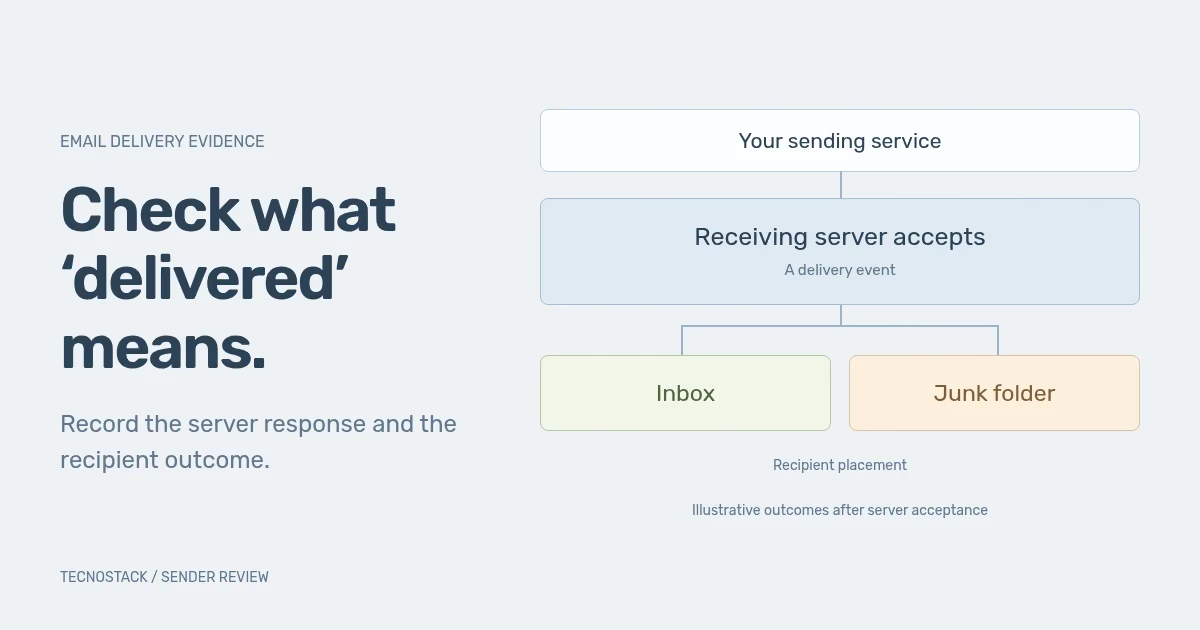
Ask what your email tool means by “delivered”. Twilio SendGrid, for example, records delivery when the receiving server accepts the message; that does not guarantee inbox placement, because the recipient's filters can still route it to junk. A delivered event therefore answers a different question from “did this person see the message in their inbox?” SendGrid delivery definition
Keep delivery, placement and engagement observations separate. A test inbox can show what happened for that particular recipient and message. It does not establish a universal placement rate. An open-tracking result is another observation, with its own collection limits; it should not replace the delivery record.
When a colleague says that email is “not working”, ask for a specific example. Was it never attempted, deferred, rejected, accepted but found in junk, or received with a broken link? Each condition leads to different evidence and a different next action.
List the services that send as your organisation. Include staff mail, campaigns, store notifications and application messages. Record the visible From domain and the provider's actual sending configuration, rather than assuming everything uses the same path because the address looks familiar.
| Mail purpose | System to identify | Evidence to retain | Receiving owner |
|---|---|---|---|
| Staff correspondence | Company mailbox provider | Sending domain and a representative received message | Mail administrator |
| Marketing campaigns | Campaign provider and account | Domain configuration, message reference and audience rules | Marketing operator |
| Store notifications | Store platform or connected mail app | Actual sender settings and an order-message example | Store operator |
| Application messages | Application, relay or email API | Sending path, message logs and a received example | Application operator |
This is a worksheet, not a recommended list of products. Add any other path that actually exists, and name the person who can change it. A provider migration or a newly installed store app should trigger a review of the affected row.
For a managed sending service, ask which DNS records you control and which infrastructure settings the provider owns. Forward and reverse DNS, sending IPs and transport settings are not all necessarily editable in your website's DNS panel. Assign the change to the right operator.
Google's requirements for mail sent to personal Gmail accounts distinguish all senders from bulk senders. Authentication for all senders requires SPF or DKIM; bulk senders need SPF, DKIM and DMARC, alongside other DNS, transport, formatting and reputation requirements. For direct mail, DMARC alignment connects the visible From domain with an authenticated SPF or DKIM domain. Google sender requirements
Yahoo also distinguishes all senders from bulk senders and publishes authentication, unsubscribe and complaint requirements. Review the relevant provider's current guidance and your actual sending category. A checklist copied from another provider can omit a required mechanism or use a different definition. Yahoo sender requirements
Record the guidance URL, review date, applicable category and person responsible for each unresolved item. These are mailbox-provider requirements, not a complete statement of every obligation that could apply to your business.
Compare the configured DNS records with the authentication results on a representative received message. Check which service sent it, which domains were used and whether the result matches the intended configuration. A green setup screen for one provider does not verify another application sending through a different relay.
Consider a hypothetical store whose newsletter uses a configured campaign provider, while an old application sends through a separate service. A newsletter test can pass even though the application's mail has a different authentication result. The useful next step is to identify and repair that path, then retest it, rather than repeatedly changing the campaign template.
Use the provider's supplied values and a reviewed change plan. Keep the current configuration and expected effect available to the person making the change. Avoid publishing an aggressive domain policy before the team has accounted for legitimate senders and reviewed the implications for their mail.
Review both the visible unsubscribe route and any required header mechanism. Google's bulk-sender rules require one-click unsubscribe for marketing and subscribed messages as well as a visible link in the body. Confirm the supported implementation with your provider and test the resulting recipient status. Google unsubscribe requirements
Follow a test opt-out through the systems that select the audience. Confirm that the relevant marketing message is withheld afterwards and that a later import or synchronisation does not silently restore eligibility. Keep the person's preference distinct from the existence of their customer record.
Review how the audience joined and what they expected to receive. Yahoo recommends sending wanted mail, setting frequency expectations and avoiding purchased lists. A technically authenticated message can still be unwanted. Yahoo audience recommendations
Capture the following evidence before asking another team to investigate. Retain the exact response where available; “it bounced” loses useful information about the reason and which system produced it.
| Evidence field | What to record | Decision it helps make |
|---|---|---|
| Message identity | Provider reference, sending path and timestamp with timezone | Which attempt and configuration are involved? |
| Recipient destination | Recipient provider and a controlled reference to the address | Is the issue concentrated at a destination? |
| Provider status | Attempted, deferred, rejected or accepted, using the tool's definitions | Which stage needs investigation? |
| Response | Exact code and explanation returned by the recipient system | Does the provider identify a temporary, authentication or policy issue? |
| Authentication | Results from a received example on the relevant path, where available | Does actual mail match the intended domain setup? |
| Audience state | Permission source, suppression and recent relevant changes | Should this message have been attempted? |
| Resolution | Named owner, proposed change and retest result | What was fixed and what remains unexplained? |
Share only the data needed for the investigation. A private message reference and a redacted example are often more useful than pasting a customer list into a public ticket. Preserve enough context for the provider to trace the attempt through the agreed support channel.
Use the recipient provider's own definition when reviewing complaints. Yahoo, for example, calculates its spam rate against mail delivered to the inbox. A percentage in another dashboard may use a different denominator, so do not compare the two as though they measure the same population. Yahoo complaint-rate definition
After a change, retest the affected sending path and the audience conditions. Record what improved, what remains uncertain and the observation period. Avoid changing several unrelated settings at once when you need to understand which correction resolved the problem.
TecnoStack's managed-hosting service retains its published email-DNS checks. For campaign planning, flow rules, content and a broader sender review, the email marketing service defines the additional scope. Bring the sender inventory and a diagnostic example so the proposal can distinguish existing inclusions from new work.


