
An abandoned-cart email flow needs a verified entry event and checks that withhold reminders when the customer has bought, opted out or no longer qualifies. Test those conditions before activation. A reminder that sends on schedule can still be wrong if the event used to stop it is missing or arrives late.
Start by naming the task you are recovering: adding an item to a cart or beginning checkout. Then review the existing messages, the data available to the email provider and the page the customer will return to. If you are still choosing which automation to build, use the first-flow readiness matrix.
Write down the source platform, event name, customer identifier and cart or checkout identifier. Inspect a representative event to confirm the fields your message needs: product reference, quantity, language and a supported return link, where available.
Klaviyo distinguishes flows triggered by Added to Cart from those triggered by Started Checkout. Its documentation also notes that integration sync timing varies. The label “abandoned cart” therefore does not establish which action is tracked or how quickly its data arrives in your account. Klaviyo abandoned-cart guide
Record the completion event with equal care. Confirm what the store considers a completed order, how it is connected to the same customer and how cancellations or alternative payment routes affect the agreed rule. Do not assume that a field called “order” has the meaning your team needs without inspecting it.
Check the store's built-in recovery flow and connected apps. Record the channel, trigger, timing, audience and active state for each reminder. Decide which tool owns each customer moment and how other messages are excluded.
Salla's reminder documentation lists email alongside other delivery channels. Zid documents email, SMS and WhatsApp reminders and distinguishes manual sending from automatic reminders. A reminder configured in one channel is not evidence that the email automation has the same rules or operating state. Salla reminder channels, Zid manual reminders
Keep existing plan inclusions visible during this review. Several published TecnoStack store plans include cart or checkout email work within stated limits. Check the store service and your agreed scope before paying to rebuild something already included. Extra messages, integrations or ongoing operation should address a named requirement.
This is an original planning worksheet. Adapt the conditions to the provider and store; some checks may require additional data or implementation work. Do not describe them as active until you have tested the actual setup.
| Situation before the proposed reminder | Intended decision | Evidence to inspect |
|---|---|---|
| Checkout remains unfinished and the recipient meets all agreed rules | Send the relevant reminder | Current qualification and a usable return destination |
| Purchase completed since this flow entry | Skip the reminder | Matched completion event received before the action check |
| Recipient opted out or is suppressed | Withhold marketing email | Current status and the provider's skip record |
| Another entry occurs inside the agreed re-entry restriction | Prevent another eligible entry according to the rule | Event history and configured re-entry behaviour |
| Product or checkout cannot be used | Withhold or use an explicitly approved alternative | Availability or link check and the agreed fallback |
| Optional first name is missing | Use the reviewed neutral greeting | Rendered message without an empty placeholder |
| Required event or eligibility data is unreliable | Pause the affected sending path and investigate | Missing or delayed event record and a named owner |
Distinguish optional personalisation from required eligibility. A missing name can have a harmless content fallback. A missing purchase signal can change whether the message should exist at all. Treating both as an empty text field hides the more consequential problem.
Entry filters, action-level eligibility checks and re-entry controls serve different purposes. Verify when each configured rule is evaluated. A condition checked only at entry cannot, by itself, respond to a purchase that happens later.
In Klaviyo, profile filters are checked on entry and before flow actions. Failing a filter before an action skips that action; the profile may continue and be evaluated again at later actions. The provider's checkout example uses a profile condition that excludes orders placed since entering the flow. Review the dedicated filter documentation rather than assuming every failed check permanently removes a profile. Klaviyo trigger and filter behaviour
Test a purchase before the first reminder and another after the first reminder but before the next. Also test an opt-out while the person is waiting. The expected behaviour belongs in the brief, and the actual skip record belongs in the acceptance evidence.
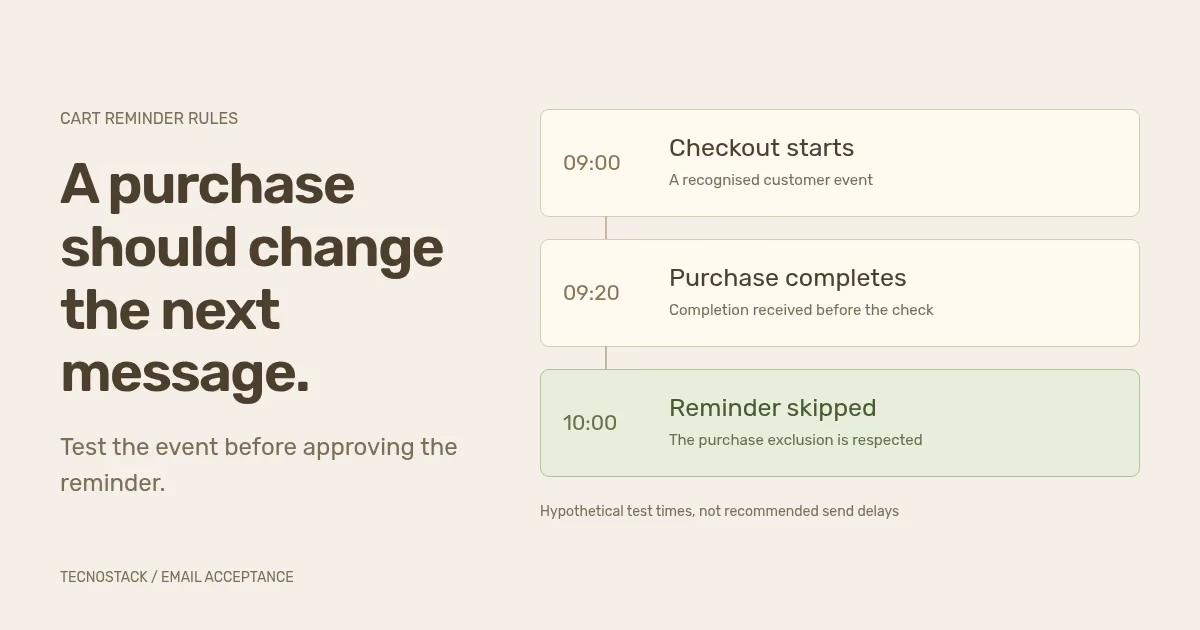
The times below are invented for a test exercise. They are not recommended sending delays or observed client behaviour.
| Time in this example | Event or action | Expected evidence |
|---|---|---|
| 09:00 | Customer starts checkout | Identifiable checkout event in the store |
| 09:05 | Provider receives the event and accepts the flow entry | Matching event and entry record |
| 09:20 | Customer completes the purchase | Completion event tied to the appropriate profile |
| 09:21 | Provider receives the completion event | The event is available to the exclusion check |
| 10:00 | Reminder reaches its eligibility check | Purchase condition fails; reminder is skipped |
Now change the test: the purchase event arrives at 10:10. The provider may lack the information needed to skip the 10:00 action. Investigate the integration delay, matching and event processing before changing copy or adding messages. A longer delay may be part of an agreed design, but it cannot repair an event that never arrives.
Repeat the exercise with a returning shopper, another checkout and an opt-out. Keep the event times, profile reference, expected decision and actual result together so the team can reproduce a discrepancy without guessing from an aggregate report.
Write the message around continuing a valid checkout or getting relevant help. Check that the product, price wording and destination still make sense when the message is received. Avoid claiming an item is reserved or nearly sold out unless the system can support that statement for the particular message.
A discount is a commercial decision. If the business chooses one, record who qualifies, what it excludes, when it expires and how it affects the order. Test the code or offer in the intended checkout. Do not copy a discount from a template merely because a placeholder is available.
For Arabic and English versions, review subject, preview, body, button text and destination language. Test long product names and mixed-language references. A neutral greeting should read naturally in both languages, and a missing image should not remove the information needed to understand the message.
Before activation, review the sender setup, permission rules, suppression behaviour, links and representative send-or-skip cases. Confirm which existing flow remains active and how the new configuration avoids overlapping reminders. Record who approves activation and who can pause the affected flow if a fault appears.
Review skips by reason after launch. A purchase exclusion working correctly can increase the skip count while improving the relevance of what is sent. Inspect confirmed orders and the chosen attribution definition separately; the email measurement guide explains why credited revenue does not, on its own, prove additional sales caused by the reminder.
Use TecnoStack's email marketing service to scope a review or implementation around your actual platform and current recovery setup. A useful initial brief includes the two event names, existing reminder inventory and the completed decision table. Customer-level exports are unnecessary for that first conversation.


