
An email cutover is ready when the destination can receive and send the agreed mail, users can do their work, and someone owns the messages that arrive during the transition. Changing MX records is one step in that decision. It does not move old messages or prove that the source can be closed.
Prepare a written readiness record, a mail-flow acceptance worksheet and a recovery decision before the change window. This guide uses “cutover” for the operational switch between mail systems. A provider’s specifically named migration method can have different eligibility, synchronisation and closure steps.
Start with the business email migration checklist: accounts, aliases, shared addresses, historical data and supported migration paths should already have owners. Verify the destination accounts and required licences before directing incoming mail there. A domain verification screen does not establish that every intended recipient exists.
Confirm where authoritative DNS is managed. The registrar, website host and mail provider may be different organisations. Identify the person who can edit the relevant zone, the person who approves the change and a reachable fallback contact. Record the current values before editing; do not combine an unrelated nameserver or website move with the mail switch.
Use this original readiness record as a working document. Replace each example with the actual system, evidence location and owner. An unanswered blocking row is a reason to postpone the change, rather than an item to discover after messages start arriving.
| Readiness area | Evidence to record | Decision before the window |
|---|---|---|
| DNS authority | Zone, current records and authorised editor | Confirm access and intended records |
| Destination recipients | Users, aliases and shared-address mapping | Resolve missing or conflicting addresses |
| Historical content | Initial import results and item exceptions | Accept coverage or name remaining work |
| Sender authentication | Staff, website and application message evidence | Resolve failures on required paths |
| User access | Representative browser, device and delegation tasks | Confirm people can perform their work |
| Late source mail | Chosen sync method, frequency and stop condition | Assign reconciliation responsibility |
| Recovery | Decision owner, trigger and data-handling steps | Agree when to pause or change routing |
| Communications | User instructions, support contact and update channel | Confirm who receives each update |
Keep this record accessible if email itself becomes unavailable. A support plan that depends entirely on the mailbox being moved will be difficult to use during an access problem. Share the agreed alternative channel with the affected team before the window begins.
DNS TTL controls caching of a record. Lowering it in advance may support a planned change, but existing cached answers can remain until their earlier lifetime expires. Cloudflare’s TTL documentation explains this distinction; a new value does not recall every old answer.
Record the previous TTL, any preparatory change and the time of the MX update. Check the authoritative answer and observations from relevant external resolvers, then test actual delivery. One DNS lookup and one successful message are useful observations, not evidence that every sender has converged.
Do not invent fallback MX values or leave conflicting providers listed without a deliberate, supported design. Follow the target provider’s instructions for the domain and selected method. Keep outbound authentication separate: changing inbound MX does not automatically fix a website’s sending identity. Use the SPF, DKIM and DMARC guide for that review.
Test named scenarios with agreed test accounts and harmless content. Save a timestamp, sender, recipient, observed destination and relevant delivery result. Protect any message details in the project record. Avoid using a customer’s confidential thread merely because it is easy to find.
This acceptance worksheet covers different failure paths. Adapt it for the organisation’s actual shared addresses, applications and devices. A check passes when its expected behaviour is observed, not when somebody has merely sent a test message and assumed it arrived.
| Path | Expected observation | If it fails |
|---|---|---|
| External sender to employee | Message appears in the intended destination mailbox | Inspect routing, recipient mapping and delivery evidence |
| Employee to external recipient | Recipient receives the message with expected sender identity | Review outbound service and authentication |
| Alias to employee | Alias reaches the mapped mailbox without an unexpected loop | Check the alias and any forwarding rules |
| Shared address and reply | Authorised delegate receives and replies as intended | Review delegation and send permissions |
| Website or application message | Agreed recipient receives the expected notification | Check that system’s own sending path |
| User’s normal mail client | Sign-in, send, receive and relevant calendar task work | Review client setup and method-specific limits |
| Source receives late mail | Item is recorded and reaches the agreed final location | Reconcile through the supported transition process |
Test both directions and the shared work that matters. A working personal mailbox can hide a broken support address. Record failures separately from passed paths so the decision owner can distinguish a non-blocking preference from a missing operational requirement.
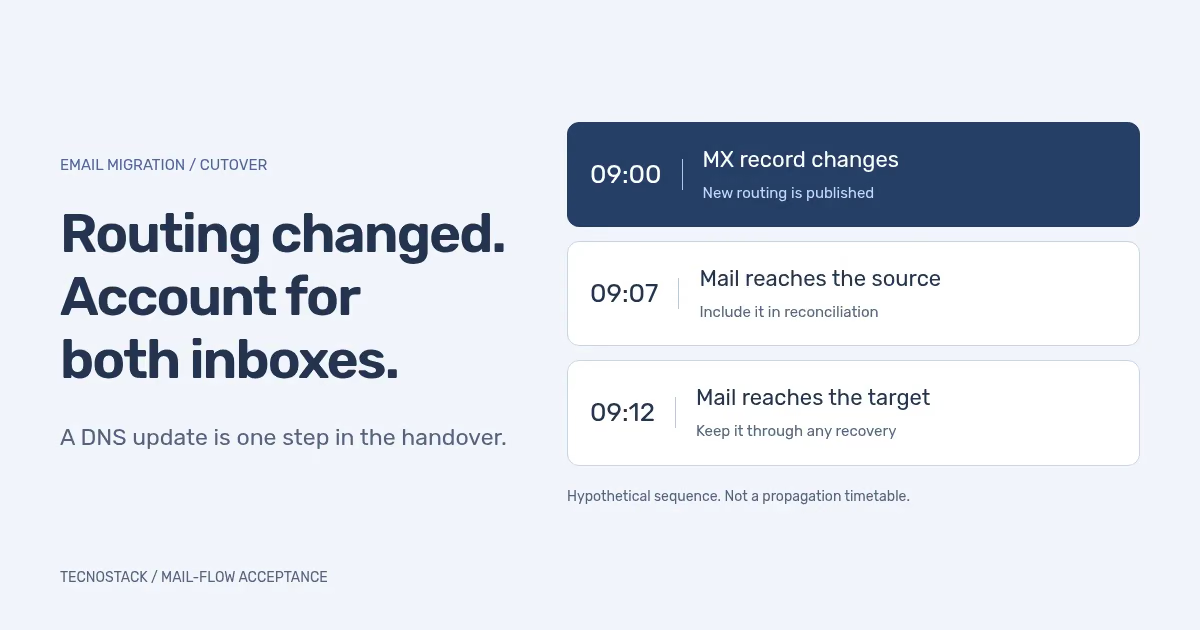
Consider this hypothetical timeline. At 09:00, the DNS owner changes MX. At 09:07, an external message reaches the old source. At 09:12, a different message reaches the destination. These times illustrate a reconciliation problem; they are not a promised propagation schedule or an observed customer incident.
The migration owner must account for both messages. The source item needs the chosen supported copy or synchronisation path. The destination item must remain available even if a recovery decision later sends new incoming mail back to the source. Reversing routing does not automatically combine the two histories.
Keep identifiers and exceptions sufficient to reconcile meaningful items. Counts alone can conceal duplicates, moved messages or unsupported content. If users can work in both systems during the transition, agree where they should send mail and edit calendars; otherwise the team may create changes that the selected method does not synchronise.
Provider sequencing matters. Microsoft’s IMAP migration guide separates routing verification from deleting the migration batch. Deletion stops synchronisation, so later source arrivals will not be copied by that batch. Its timing instructions belong to that method; do not replace them with a generic short-TTL rule.
Google’s current Exchange Online delta-import guidance describes supported changes and exceptions for that particular source. Do not assume every import tool copies edited drafts, moved calendar items, permissions or contacts identically. Confirm what the selected method can reconcile before promising a clean merge.
Define the decision before the window: which missing paths block acceptance, what evidence triggers investigation, and who has authority to change the plan. A failed critical shared address may justify pausing even when most personal mailboxes work. An isolated client preference may instead become a documented follow-up with an agreed owner.
If recovery is needed, preserve the observations from both systems and follow the approved routing and data plan. Name the person checking newly received or sent messages at the destination. Do not treat “restore DNS” as a complete recovery procedure or close the source while investigating unresolved delivery.
Close the migration only after acceptance, reconciliation and the selected method’s completion steps. Record residual exceptions, user guidance, administrative ownership, exports and applicable retention requirements. Remove temporary access through the agreed handover process, and separately authorise any subscription cancellation.
TecnoStack’s business email service can scope the readiness review, supported migration, cutover and operating handover. Bring the source and target providers, domains, mailbox types and required business paths. The platform comparison worksheet helps confirm those requirements before selecting a configuration.


