
A deployment rollback plan should identify the last compatible application version, the conditions for using it, the person or rule that decides, and the checks that confirm recovery. It must also account for data changes, queued work and external actions. Keeping yesterday's build is useful, but it does not prove yesterday's code can run safely against today's state.
Write the plan for the release being considered. A generic instruction to “roll back if there is a problem” leaves the hardest decisions to the moment when the team has the least information. Start with the CI/CD release record, then add the recovery evidence for this change.
Application rollback returns the running code or configuration to an earlier compatible state. Disabling a feature may avoid the faulty path while leaving the new application in place. A forward repair introduces another change. Data restore returns stored information to a supported recovery point and creates its own reconciliation work.
Choose among these actions using the failure and current state. A faulty presentation change and a destructive data migration need different responses. Do not make restoring the entire database the default reaction to every failed screen. It can affect valid business activity that occurred after the recovery point.
The Azure safe-deployment guidance connects rollout health to recovery decisions. Apply that principle to a specific user journey and an actionable signal. Define what the signal establishes, how missing observations are handled and which person investigates ambiguous results before initiating a potentially damaging action.
Keep the decision record short enough to use during a failure, with links to the detailed procedures. Store it somewhere the authorised team can reach if the deployment platform is unavailable. Reference credentials through the approved access process rather than placing secrets in the document.
This original worksheet can accompany the release. Complete the evidence column before treating the recovery option as ready. A named owner with no access, or a backup that nobody has restored, leaves an unresolved dependency.
| Record | Question to answer | Evidence to keep |
|---|---|---|
| Release identity | What code and configuration are running? | Exact revisions, package identifiers and target environment |
| Recovery trigger | What failure justifies this action? | User-flow condition, signal, observation rule and exclusions |
| Decision authority | Who can start, stop or escalate recovery? | Named owner, cover and contact route |
| Compatible target | Which version can read and use the current state? | Application, schema and message-compatibility results |
| Data boundary | What has changed since the candidate was deployed? | Migration state, new writes and supported recovery points |
| External effects | What happened outside this application? | Transaction references, messages and reconciliation ownership |
| Procedure and access | Can the operator execute the intended action? | Versioned runbook, permissions and rehearsal record |
| Acceptance | What proves useful operation has returned? | Agreed user journeys, record checks and relevant signals |
| Communication | Who needs an update and a follow-up? | Internal recipients, user-impact owner and incident record |
Include the sequence for stopping additional rollout and controlling work that could worsen the problem. Whether to pause writes or workers depends on the application and the incident; make the decision explicit. An operator should not discover during recovery that a second pipeline is deploying another version at the same time.
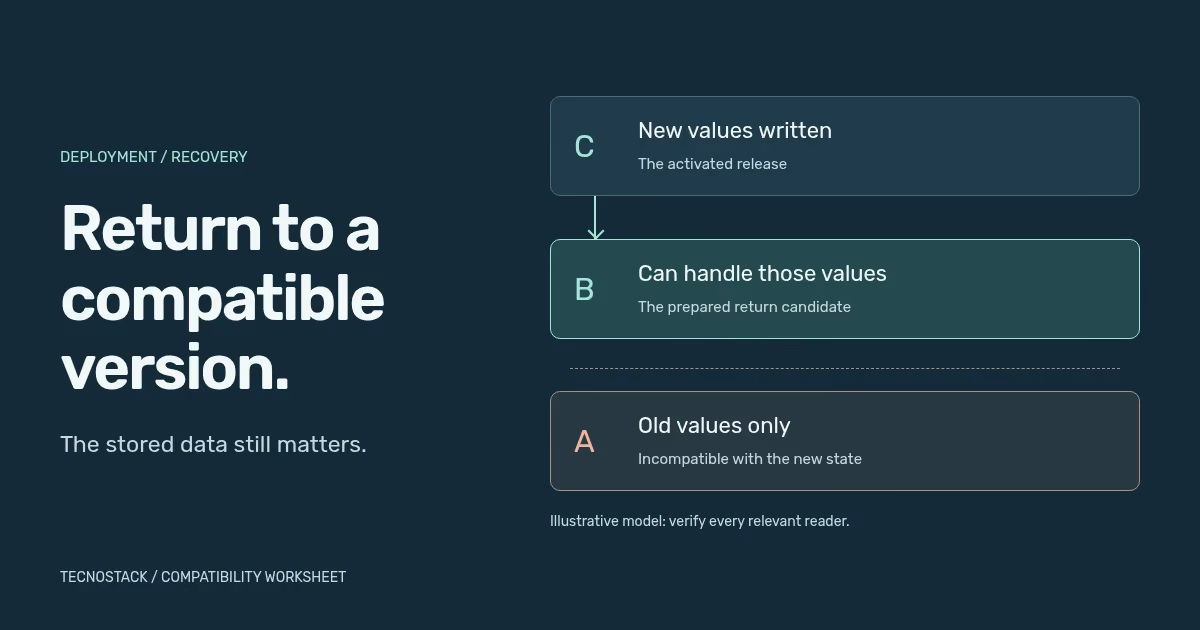
Consider an invented support-ticket application. Its initial version, A, understands open and closed. A proposed feature introduces awaiting_customer. If the new application writes that status before every relevant reader can handle it, an older screen, worker or export may fail when it encounters the record.
The original example below separates preparation from activation. Assume B correctly handles the new status in reads and user actions, preserves existing values, and continues creating only the original statuses. It is a compatibility model to test against an actual application, not an executable migration recipe.
| Version | Reads and behaviour | New values it creates | Recovery boundary |
|---|---|---|---|
| A: original | Handles open and closed only | Original statuses | Cannot handle records using awaiting_customer |
| B: prepared | Handles original and new statuses correctly | Original statuses; preserves existing new values | Return to A requires confirming no incompatible state exists |
| C: activated | Handles original and new statuses correctly | Can also create awaiting_customer | B is the candidate return path; A is incompatible once new values exist |
Before activating C, confirm that every relevant reader has the required behaviour. Include background workers, scheduled exports and consumers of retained messages. A partially completed preparation deployment is not enough. The AWS rollback-safety article explains this prepare-and-activate approach and the danger of incompatible protocol changes.
After C has written the new value, returning to B can preserve a compatible reader. Returning straight to A cannot be assumed safe. Removing the feature flag does not erase values already stored or messages already queued. Verify the actual state and keep the prepared version available for the agreed recovery period.
Real database changes add further constraints: schema locks, application behaviour, migration completion and the reversibility of transformed data. The AWS schema-change guidance recommends compatibility work across old and new versions. An instruction named “down migration” is not evidence that it preserves every important record.
Returning the application version does not recall an email, cancel a completed shipment or reverse a charge in another system. Record those effects separately and assign the reconciliation task. Any compensating business action needs the appropriate authority and the provider's supported process.
Treat retries carefully. A timed-out request can leave uncertainty about whether an external action completed. Retrying it blindly may repeat the effect. The AWS retry and idempotency guidance explains why replay and retry can execute work more than once. Its specific SDK execution modes are not a general guarantee of exactly-once business processing.
During rehearsal, include a queued message created by the new version and consumed after the return. Check payload compatibility, duplicate handling and what happens when a record no longer matches the worker's assumptions. A successful web-page check will not reveal every background failure.
Confirm the database product's actual restore behaviour, retention, permissions and dependencies. For example, Azure SQL point-in-time restore creates a new database; it does not overwrite the existing one. Recovery therefore includes validating the restored state and reconnecting the application through the supported procedure. Other products may behave differently.
Identify valid activity after the chosen recovery point and how it will be reconciled. Also check files, search indexes, queues and connected systems that may now describe a different state. A database that has started successfully is not the same as a business workflow that has been restored coherently.
Agree recovery objectives with the business. Azure's recovery guidance defines RTO around acceptable restoration time and RPO around acceptable data loss measured in time. These are targets to design and test against. Writing them in a document does not create a measured capability or a contractual guarantee.
Use a controlled staging environment with representative versions, configuration and suitable test data. Exercise the forward change, mixed-version state where applicable, and the planned recovery after new writes. Record the actual steps, time, access problems, lost observations and unresolved dependencies. Avoid destructive production experiments as a substitute for preparation.
Have the operator verify the agreed user task, permissions, background processing and relevant records. Keep observing for the defined period, then close the incident through the named owner. Update the runbook when the rehearsal reveals a different sequence or a missing capability.
Bring the release, data change and proposed return path to a DevOps recovery review. Existing hosting and operating scopes may already include specified backup or recovery work; review those inclusions first. Where compatibility requires an application change, scope that work explicitly rather than promising that a deployment tool can resolve it alone.


