What should a headless CMS content model look like if it has to survive redesigns, new channels and a second language? Model the stable things your organization talks about, such as products, services, locations, people and articles, with fields named for what they mean. Let pages assemble those entities. Then decide, for each content type, how the Arabic and English versions relate, who publishes them and what happens when one is missing.
Most content model problems don't show up in the first demo. They show up later, when editors paste the same author bio into dozens of entries, a redesign makes field names meaningless, or an Arabic page has nowhere to put a local example the English page doesn't need. This guide covers the decisions that prevent those problems.
A page layout is one of the least stable parts of a website: it changes with every redesign. The things your organization describes change far less. A clinic has doctors, specialties and branches; a software company has services, case studies and articles. Model those as content types and let page templates decide how to arrange them.
Name fields for their meaning, not their position or appearance. A field called heroTitleBlue stops making sense when the hero is redesigned or the same content appears in an app, an email or a search result. A field called title or summary keeps working. A useful test for every field: if this content were sent to a different channel tomorrow, would the name still be accurate?
Give each content type one clear job, too. A "page" type that can hold every possible section becomes a junk drawer: editors can't tell which fields matter, and developers can't tell which combinations are valid.
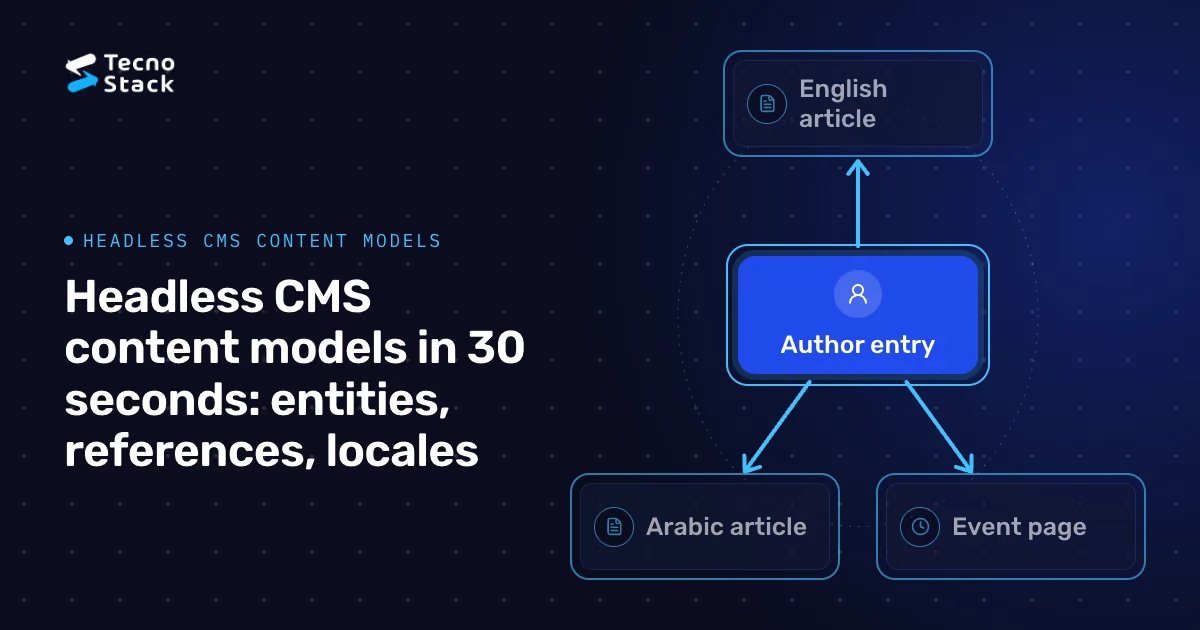
When the same data appears in more than one entry, such as an author, a category, a branch address or a product specification, make it its own content type and point to it with a reference. Copying it into each entry turns every change into a search-and-replace exercise, and the copies drift apart.
References bring decisions of their own, and they are worth making on purpose:
- Deletion and unpublishing: what happens to articles that reference an author who leaves? Block the deletion, replace the reference or hide the byline?
- Depth: keep nesting shallow. If a structure needs several levels of nested components, it usually wants a new content type and a reference instead. Deep trees are harder for editors to reason about and harder to cache precisely.
- Cross-locale references: should the Arabic article point to the same author entry as the English one, with localized name fields, or to a separate Arabic author entry? Decide once per type and document it.

Figure 1 — Reference shared content. One author, several pages.
CMS platforms generally offer two broad ways to localize. Sanity's localization documentation, for example, describes field-level localization, where one document holds every language in its fields, and document-level localization, where each language is a separate document linked to its translations. Neither suits everything, so choose per content type:
- Field-level fits content whose structure is identical in both languages and changes together: navigation labels, product specifications, office details and author names. Languages stay side by side, and missing translations are easy to spot.
- Document-level fits content that can diverge: articles, campaign pages and legal pages that need their own examples, publishing dates or approvals. An Arabic article might need a different introduction or a regional example that the English version doesn't have.
The deciding questions are practical. Is the structure the same in both languages? Are the versions published together? Who owns each language? A mixed model is normal: a document-level article can reference a field-level author entry.
Every bilingual model needs written answers to questions the CMS won't answer for you:
- Missing translations: does the Arabic page fall back to English text, show a notice or wait until the translation is ready? English text under an Arabic URL and page language confuses readers and assistive technology, so we prefer to hold the page back or show a clear notice.
- Ownership and approval: who writes, reviews and approves each locale, and can one language publish before the other?
- Slugs: store each locale's slug as its own field, set by a person and kept stable when titles change. Regenerating slugs from titles breaks links.
- Translation links: keep an explicit link between language versions so the site can switch languages on the same page and declare language alternates.
Arabic content adds requirements that an English-only model can miss:
- Direction belongs to the front end. Store plain text without embedded directional control characters and let templates set the language and direction. Mixed-direction strings, such as an Arabic sentence containing a Latin product name or a phone number, are handled when rendering, not by altering stored content.
- One authoritative date. Store a real date value, not a formatted string. If an audience needs a Hijri date, convert it in the presentation layer so sorting and filtering keep working.
- Sorting and search. Use locale-aware collation for Arabic lists, and normalize variants such as hamza forms and diacritics in the search index rather than in the stored text.
- Text alternatives in every locale. Image alt text is content, so give it a field in each language. The W3C's WCAG 2.2 quick reference lists text alternatives among its criteria, alongside keyboard access, focus and contrast. The field makes good alt text possible; a reviewer still has to check that it is meaningful.
No model survives a growing organization unchanged, so treat model changes as migrations, not edits. An illustrative example: an events site stores each venue as free text inside every event. To make venues reusable, the team:
- adds a Venue content type and a reference field on Event, keeping the old text field for now;
- backfills venues with a script, merging duplicates and logging ambiguous matches for an editor to resolve;
- switches templates to read the reference, with the old field as a fallback for one release;
- removes the old field once entry counts match and editors have checked samples in both languages.
Run the script on a copy of the data first and keep it in version control. If the content feeds a cached front end, tag cached pages by the entities they use so an edit revalidates the right pages; our guide to server components and caching in Next.js 15 covers that pattern for teams on that version.
Content models also meet other systems. CMS blocks should map cleanly to design-system components, which we discuss in AI-assisted design systems. In commerce, decide which system owns which fields, such as whether product descriptions live in the CMS or the commerce backend; our comparison of Shopify Hydrogen and headless Medusa explains that storefront and backend boundary. If you are planning a new bilingual site, our website design and development service includes structured content that your team can edit in Arabic and English.

Figure 2 — Migrate in controlled stages. Verify before removing old fields.
- Sanity. Localization: field-level and document-level approaches to localizing content.
- W3C Web Accessibility Initiative. How to Meet WCAG 2.2 (Quick Reference): criteria including text alternatives, keyboard access, focus and contrast.
CMS capabilities differ and change, so check your platform's current documentation. The modeling recommendations here are TecnoStack's guidance, not requirements from any CMS vendor.