AI is useful in a design system as a drafting assistant. It can write token documentation, expand component variants, produce realistic test copy in two languages and propose scaffold code. It should not become the owner of the system. The token source of truth, the component APIs, the accessibility decisions and the Arabic and right-to-left (RTL) review need named people on your team, because generated output can look finished while being wrong in ways automated checks do not catch.
This guide separates the two layers and sets out a review flow in which drafts get faster without the system drifting.
A design system has a mechanical layer and a decision layer. The mechanical layer can be checked against something you already own: a token file, a component specification, a naming rule. The decision layer defines those things in the first place: which colors exist, how a component behaves, what "accessible" means in a real flow and how the Arabic interface reads.
TecnoStack's working rule follows from that split. Let AI generate output that can be verified against a definition your team owns. Keep the definitions themselves, and every judgment that cannot be verified mechanically, with people who are accountable for them.

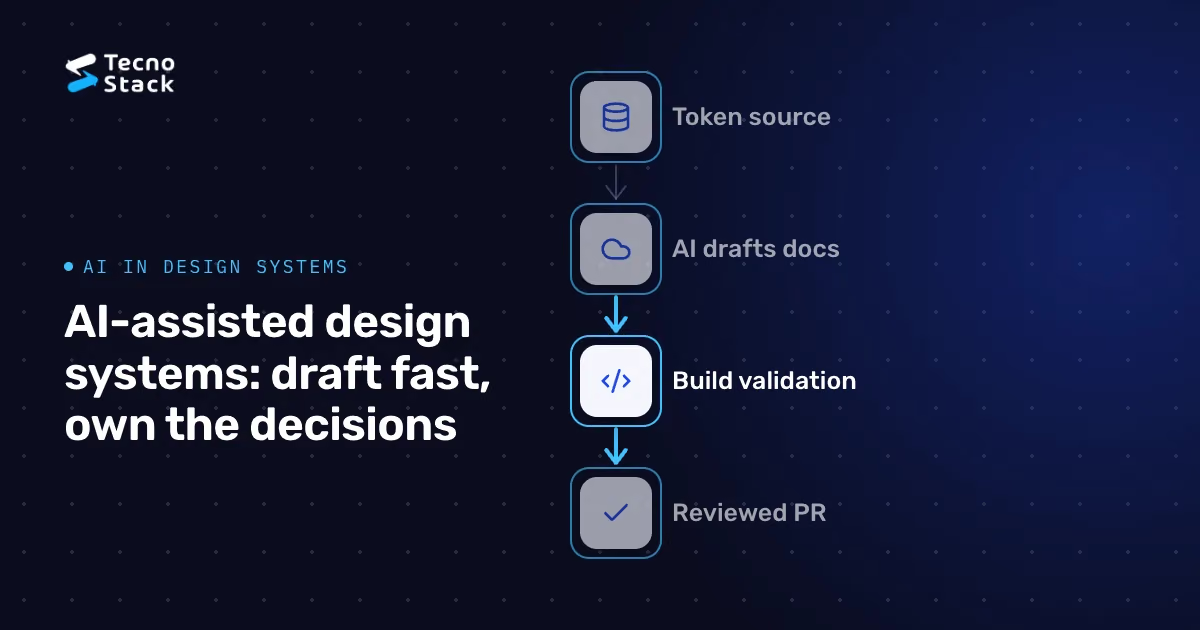
Figure 1 — AI drafts; your team decides. Keep owners for system decisions.
- Token documentation and format conversion. From a canonical token file, a model can draft usage notes and convert values into the formats each platform needs. A build script then confirms that the output matches the source; the model's own account of what it did is not evidence.
- Variant matrices. Given one component, a model can list the sizes and states to consider: default, hover, focus, disabled, error and loading. Designers decide which ones the system supports.
- Realistic test copy in both languages. Short and long strings, Arabic and English, mixed with numbers and Latin terms, reveal wrapping and overflow problems that placeholder text hides. Ask a native reader to check generated Arabic before it becomes a test fixture.
- Scaffold code. A first draft of markup and styles from a component specification gives engineers a starting point. They still review the semantic HTML, focus behavior and token usage line by line.
- Lint explanations. Deterministic linters should find hard-coded colors or spacing outside the token set; a model can then explain a finding and propose a fix for review.
- The token source of truth. One canonical file or repository, a naming scheme and a change process. Generated token changes arrive as pull requests like any other change.
- Component APIs and states. Properties, composition rules, versioning and deprecation are design decisions with long consequences. A model can suggest; a maintainer decides.
- Brand judgment. A model does not know why your brand looks the way it does unless you explain it, and even then its suggestions are options to evaluate, not decisions.
- Accessibility and bilingual behavior. Both are covered below, because they are where generated UI most often looks right and is not.
The W3C's WCAG 2.2 quick reference lists success criteria that include keyboard operation, text alternatives, visible focus and sufficient contrast. Some of these can be checked by tools: contrast ratios can be computed exactly, and a missing text alternative can be detected. Use deterministic tools for those checks rather than a model's estimate.
Others need people. Whether alt text is meaningful, whether focus moves sensibly through a dialog and whether a screen reader announces an error at the right moment all depend on the real flow. A generated component that passes an automated scan has not been certified accessible. Test it with a keyboard and at least one screen reader, in both languages, before it enters the library.
Switching direction is more than flipping the layout. Each component needs explicit decisions:
- Layout and spacing should use logical properties (start and end rather than left and right), so one component works in both directions.
- Icons need checking one by one: arrows and progress indicators that imply direction usually mirror, while logos and many symbols do not.
- Mixed-direction text, such as product codes, URLs, phone numbers and English terms inside Arabic sentences, must stay readable in the right order.
- Typography needs an Arabic typeface that shapes connected letters correctly, comfortable line height and no letter-spacing on Arabic text, which can harm connected letter shaping.
- Numerals, Western or Eastern Arabic digits, are a product decision to make once and apply consistently.
Generated components often get these details wrong in ways that pass automated checks, so review them with native readers, on real content, at narrow widths and with enlarged text.

Figure 2 — Review Arabic beyond mirroring. Use real bilingual content.
A design system for a bilingual site sits on top of a content model. Sanity's localization documentation, for example, describes field-level and document-level approaches. Whichever platform you use, decide explicitly who owns translations, how references work across locales, what happens when a translation is missing and how each locale is published. Those choices determine what your components must handle, such as a fallback string in the other language and direction. Our guide to designing headless CMS content models covers that side.
Generated components can also carry unused styles or scripts. Check what each new component adds to the page and how it affects loading and interaction metrics; our guide to Core Web Vitals explains what to measure. Size the effort to the product's stage, too: an early product may need a small token set and a handful of components rather than a full library, as our article on architecture decisions from MVP to scale discusses.
- Define first. Update the token file or component specification before generating anything.
- Generate in a branch. Label generated drafts in the pull request so reviewers know what to examine closely.
- Run deterministic checks. Token validation, linting, build output and automated accessibility scans.
- Review by role. A designer checks states and brand fit; an accessibility reviewer tests keyboard and screen-reader behavior; a native Arabic reader checks direction, typography and wording.
- Merge and document. The maintainer approves, and the documentation records decisions, not just generated output.
Used this way, AI can shorten drafting while the team controls changes to the system. If you are building or rebuilding a bilingual site and want a design system set up with these controls, our website development service can help.
- World Wide Web Consortium (W3C). How to Meet WCAG 2.2 (Quick Reference).
- Sanity. Localization, Sanity documentation.
The review practice in this article is TecnoStack's guidance. Following it, or passing automated checks, does not by itself establish conformance with WCAG.