A practical way to add a large language model (LLM) to a legacy application is to keep the model out of the legacy core. The application calls a separate adapter service through a narrow API. The adapter acts with the signed-in user's identity, gives the model a short list of typed tools, reads data within that user's permissions and can only propose changes, which then pass through the application's existing rules.
This article answers where the model goes and what it may touch. The order in which to build it, from a read-only pilot to shadow mode, rollout and rollback, is covered in our step-by-step LLM integration sequence for legacy software.
The reference design has five parts:
- Legacy core. Remains the system of record; its database, business rules and release process do not change.
- Adapter service. A separate service that owns prompts, model calls, tool definitions, output checks and AI-specific logs.
- Model endpoint. A hosted API or a self-hosted model. Only the adapter talks to it.
- Read side. Permission-filtered APIs, a read replica behind a constrained query layer, or a retrieval index.
- Write side. The application's existing business APIs, reached only through validated proposals.
The split follows from one fact: prompts, model versions and output checks change on a different schedule from legacy code. Keeping them in one service means the legacy release train never carries AI changes, and switching a feature off is a configuration change, not a redeployment of the core.
The seam borrows from the strangler fig pattern, which AWS's prescriptive guidance describes as replacing a legacy system incrementally behind a routing layer while old and new components run side by side. Our goal here is narrower, adding a capability rather than replacing a system, but the seam does the same job. If you later replace parts of the core, our guide to legacy modernization with the strangler fig pattern covers that path.
The legacy application should call task-shaped endpoints, not a generic "send this prompt" endpoint. A support screen, for example, calls a summarize-ticket endpoint with only a ticket ID. The adapter fetches the ticket through the read side, builds the prompt from a versioned template, calls the model, checks the output against a schema and returns a typed result: a summary that references the messages it used, or a typed failure.
Make failure ordinary: give every model call a timeout, and if the adapter is slow, unavailable or fails validation, the legacy screen should behave as it did before the feature existed. Keep model calls out of critical transactions such as checkout or payment posting, and put long jobs, such as summarizing large documents or classifying a backlog, on a queue whose results appear when ready.
Keep the AI configuration in one place. Prompt templates, model versions, tool lists, limits and feature flags belong in the adapter, under version control and review, not scattered through legacy code.

Figure 1 — One narrow adapter. Typed requests; checked results.
The adapter must know who is asking, and it must learn that from your server. The legacy application passes the authenticated user as a short-lived signed token, or a gateway attaches it. The adapter forwards that identity on every call to a data API, so each read is checked by the same rules that govern the legacy screen.
Do not give the assistant one powerful service account. With a shared administrator account, any prompt can become a privilege escalation, because the model can be talked into requesting records the user could never open. Nothing in the question, a retrieved document or a tool result may change identity: a message claiming to come from an administrator changes nothing.
Background jobs without a user, such as overnight summaries, get their own service identity, limited to that job's data and logged separately. Document retrieval follows the same rule at the index: filter by permission before any passage reaches the model, as our guide to permission-aware enterprise RAG explains.
Anthropic's engineering guide to building effective agents distinguishes workflows, in which code follows predefined paths, from agents, in which the model directs its own tool use, and recommends starting with the simplest design that works. Most legacy features fit a workflow: the code fetches the record, and the model summarizes, classifies or drafts. Whether a feature needs more autonomy is a business decision first; our CTO playbook for AI agents frames it.
When the model does need tools, design each one like a public API rather than a back door:
- Narrow and typed. A tool such as
get_order_status(order_id), never "run SQL" or "fetch any URL". - Mapped to existing business APIs, reusing their validation and permission checks.
- Read-only by default. A tool that would change data returns a proposal, not a committed change.
- Bounded. Allowlists, rate limits and input validation apply as they would to any untrusted request.
Treat tool results and retrieved text as data, never as instructions: a record containing "ignore previous instructions" must not trigger another tool or widen access.
Reads answer questions; writes change business records. Keep the read path within the user's permissions and free of write side effects. Read-only access can still expose sensitive information, and wrong answers can lead to harmful decisions; permission checks, evaluation and source references remain necessary.
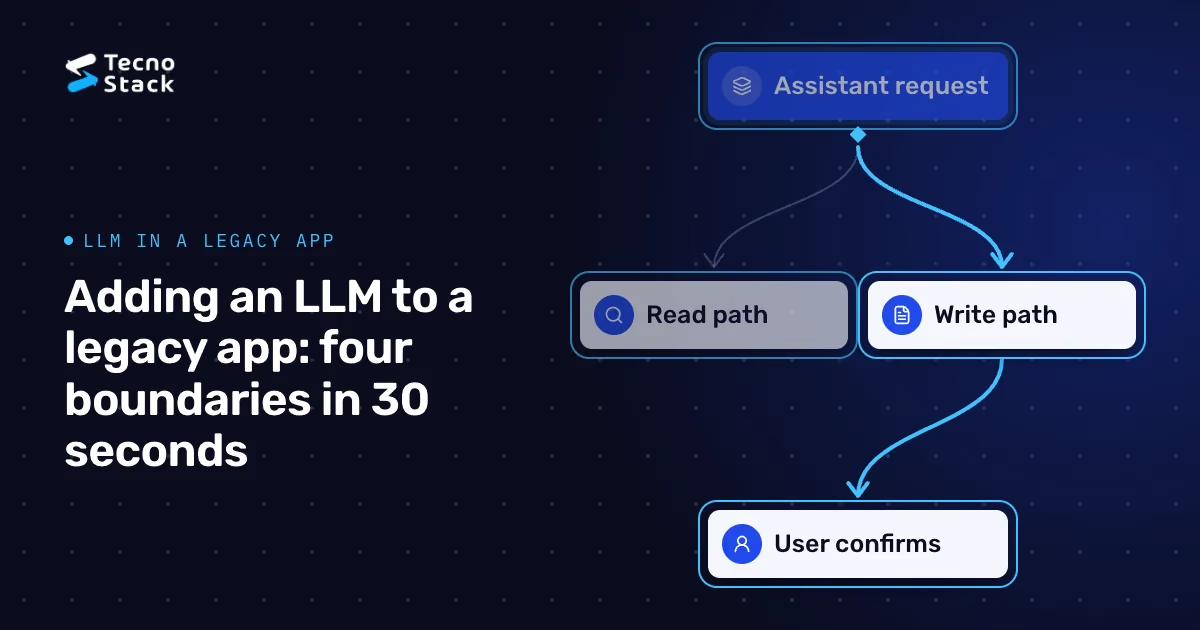
The write path is narrow. The model never commits a change. It produces a structured proposal; the legacy application validates it with the same rules as a manual entry; the user sees exactly what will change and confirms; and the existing API commits it under the user's identity, with an idempotency key so that a retry cannot apply it twice. The audit record notes that the assistant drafted the change and who approved it.
An illustrative example: a support agent asks the assistant to refund a damaged item. The assistant reads the order and the refund policy through read-only tools, then drafts a refund request with the amount, reason and policy reference. The legacy refund service validates it as it would a manual request, the agent reviews and confirms, and the refund is posted under the agent's account. If validation fails, the draft returns with the reason and nothing has changed.
For reporting questions, expose a fixed set of views on a read replica rather than free-form SQL on production.

Figure 2 — Writes wait for confirmation. Existing rules still validate the request.
- Trace every request with one correlation ID across the legacy screen, adapter, model and tool calls.
- Log what review needs: the user, prompt and model versions, tool calls, record IDs, output and validation result. Restrict access to these logs, set retention limits and redact sensitive fields.
- Set limits on requests and spend per user and per feature, so a runaway loop or abuse fails safely.
- Keep a kill switch per feature, independent of legacy releases.
- Evaluate before release and after every change to prompts, models or tools, with cases for correct answers, refusals, permission boundaries and injection attempts. Our guide to evaluating AI systems before launch covers how to build that test set.
- Calling the model from the browser or a mobile app with an embedded API key.
- A generic SQL or HTTP tool added "for flexibility".
- One shared administrator account for every assistant request.
- A synchronous model call inside a transaction that must not fail.
- Model output written straight into records without validation or confirmation.
Each of these turns the model into a participant in your core instead of a service beside it. Start with one task-shaped feature on the read path, add typed tools and the write path only when the feature needs them, and keep the identity rule non-negotiable throughout. If you want help mapping these boundaries onto your own application, our AI systems service can review the design with your team.
- Amazon Web Services. Strangler fig pattern. AWS Prescriptive Guidance, cloud design patterns.
- Anthropic. Building effective agents. The page labels its original December 2024 examples as historical rather than current API guidance.
The architecture and recommendations in this article are TecnoStack's engineering guidance, not requirements set by AWS or Anthropic.